 ECode
产品Product / 企业控制台Enterprise Console
一个控制台,
管好企业的 AIOne console for all of your enterprise AI
控制台部署在企业自己的机器或云上。管理员登录一次,就能管理员工、登录方式、模型、额度、用量和审计,不用再跳到别的后台。
The Console runs on your own box or in your own cloud. Admins sign in once to manage employees, sign-in, models, quotas, usage and audit, with no second admin tool to jump to.
控制台在哪里,谁来用Where it runs and who uses it
-
部署在你的环境里Runs in your environment
控制台和模型网关一起部署在企业现场的主机上,或企业自己的云服务器上。
The Console runs next to the model gateway, on a box at your site or on a cloud VM you own.
-
管理员的一个入口One place for admins
模型、算力和请求记录都在控制台里管理。管理员只登录一次,只看一套界面。
Models, compute and request records are all managed in the Console. Admins sign in once and work in one interface.
-
员工的登录与下载页Sign-in and downloads for employees
员工在控制台完成企业登录,也从控制台的下载页获取客户端。管理页、登录页和下载页都有中文和英文。
Employees complete enterprise sign-in through the Console and get the client from its download page. Admin, sign-in and download pages all come in Chinese and English.
控制台导览A tour of the Console
控制台按管理任务分成五组。下面逐页介绍每一页能做什么。
The Console groups its pages by admin task. Here is what each page does.
| 分组Group | 页面Pages |
|---|---|
| 访问管理Access | 用户Users |
| AI 资源AI resources | 模型与供应商Models and providers, 本地算力Local compute, 员工配额Employee quotas |
| 分发管理Distribution | 版本发布、下载密钥Releases, download keys |
| 监控审计Monitoring | 用量统计、请求日志Usage, request log, 审计日志Audit log |
| 系统设置Settings | SSO 连接SSO connection, 品牌配置、管理员Brand configuration, administrators |
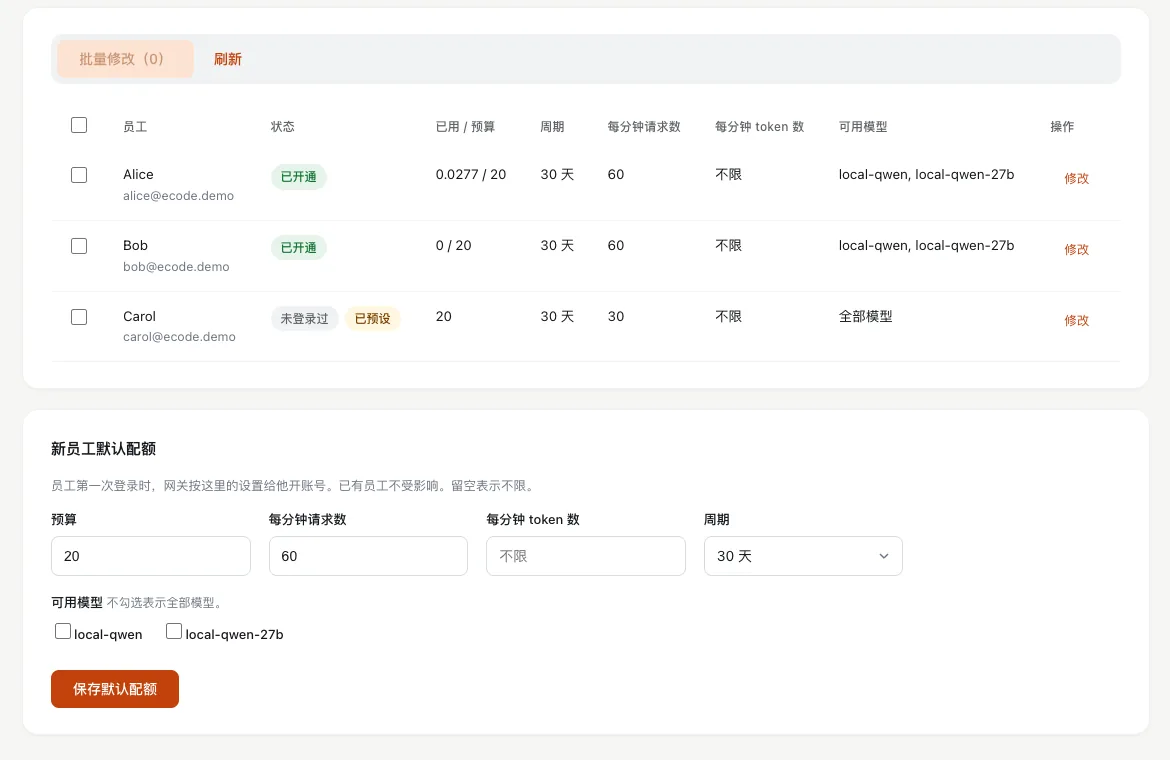
用户:员工自动建档,停用立即生效Users: employees join on first sign-in, and disabling is instant
控制台不需要手工建员工。员工第一次用企业账号登录时,控制台在用户页建档,并在网关里为他开账号、发一把只属于他的密钥。
You never create employees by hand. When someone signs in with their enterprise account for the first time, the Console adds them to Users, opens their gateway account and issues a key that belongs to them alone.
- 停用:密钥在网关立即被封,再调用模型会被拒绝,也不能再登录。
- 启用:恢复访问。
- 设为管理员:把员工提升为控制台管理员。
- Disable: the gateway blocks the key at once. Model calls are refused and the employee can no longer sign in.
- Enable: restores access.
- Make admin: promotes the employee to Console administrator.
模型与供应商:本地和云端,一张表Models and providers: local and cloud in one table
所有模型列在同一张表里:员工看到的名称、模型 ID、来源(本地或云端)、上游地址、状态和是否启用。本地模型的行链接到本地算力页。
Every model sits in one table: the name employees see, the model ID, the source (local or cloud), the upstream host, status and whether it is enabled. Local models link through to the Local compute page.
- 添加云端模型:填写 https 接口地址,选择 OpenAI 兼容或 Anthropic 兼容协议,填入 API 密钥、模型 ID、显示名和可选价格,再选择开放给全部员工或仅设为默认。
- 密钥只写入网关:保存后不再显示,也不会返回。需要时用「更换密钥」替换。
- 测试连接:通过网关发一次最小请求,显示成功或上游返回的错误。
- 编辑、停用、删除:删除时同时从员工的可用模型和模型目录中移除。每次改动都记入审计日志,不含密钥。
- Add a cloud model: enter an https base URL, pick the OpenAI-compatible or Anthropic-compatible protocol, add the API key, model IDs, a display name and optional prices, then open it to every employee or set it as a default.
- Keys stay in the gateway: once saved, a key is never shown or returned again. Use Replace key to change it.
- Test the connection: sends one minimal request through the gateway and shows success or the upstream error.
- Edit, disable, delete: deleting also removes the model from employees' allowed lists and from the model catalog. Every change is audited, without the key.
- 员工看到的名称Name employees see
- 模型 IDModel ID
- 来源:本地 / 云端Source: local or cloud
- 上游地址(不含密钥)Upstream host (no key)
- 状态Status
- 是否启用Enabled
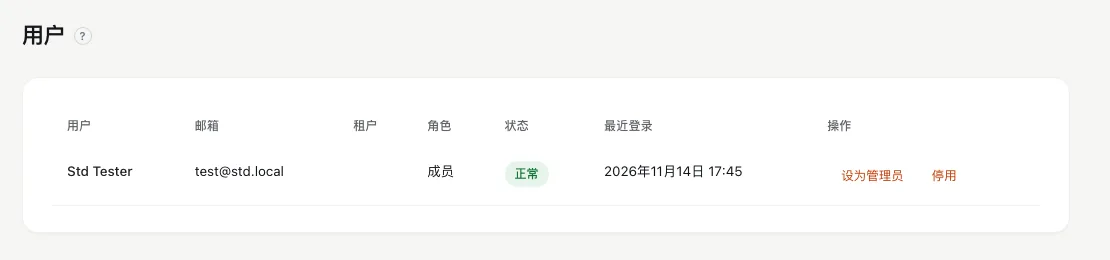
本地算力:看清每块 GPU,一键启停模型Local compute: see every GPU, start and stop models
页面上方是 CPU、内存、GPU 和显存使用率。GPU 卡片显示名称、已用和总显存、利用率和温度。模型列表显示每个实例的状态、重启次数和最近一次错误。
The top of the page shows CPU, memory, GPU and GPU memory use. Each GPU card shows its name, memory used and total, utilization and temperature. The model list shows each instance's state, restart count and last error.
- 启动和停止:在模型那一行点击启动或停止,页面自动刷新状态。
- 显存冲突提示:显存不够时,页面不直接启动,而是提示先停哪个模型,可以一步完成切换。
- Start and stop: click Start or Stop on a model's row; the page refreshes its state.
- Memory conflicts: when GPU memory runs short, the page does not start the model. It tells you which model to stop first and can switch in one step.
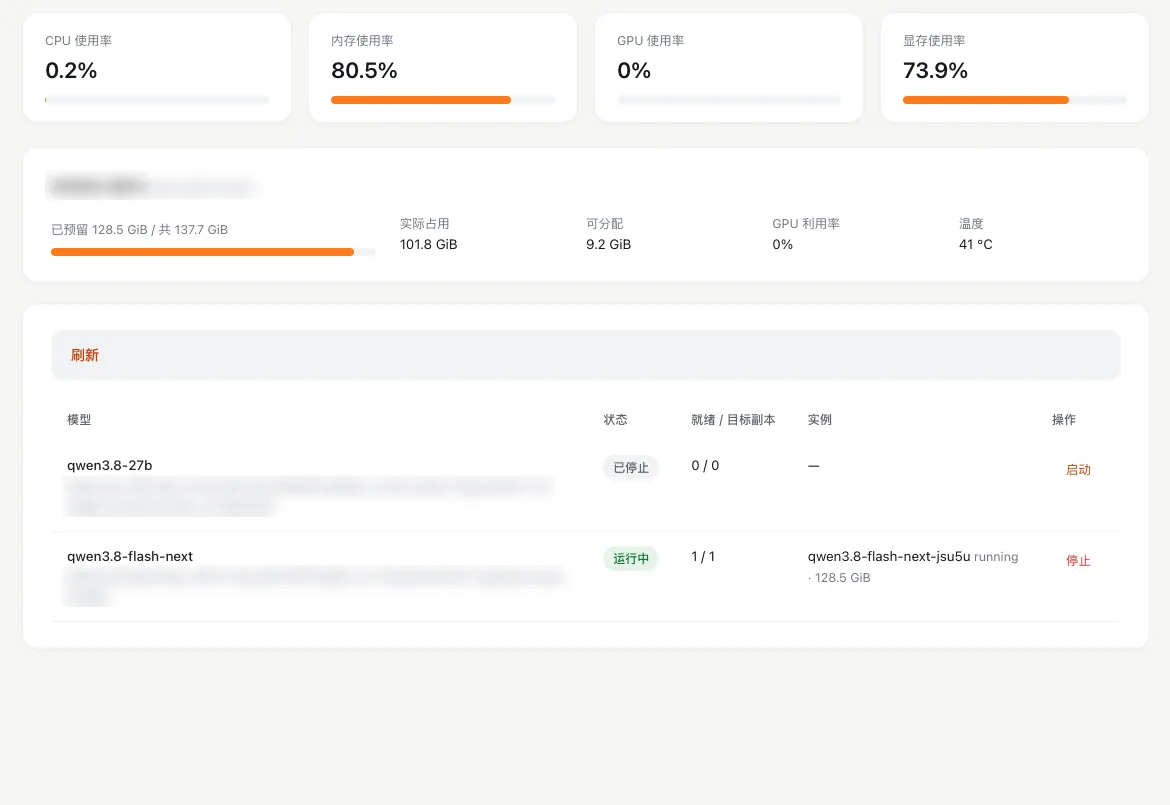
员工配额:每个人的预算和速率Employee quotas: a budget and rate limits for each person
额度挂在员工身上,不挂在密钥上。删除密钥或重新登录都不会重置额度。改动直接写到网关,并记入审计日志。
Quotas belong to the employee, not to the key, so deleting a key or signing in again never resets them. Changes go straight to the gateway and into the audit log.
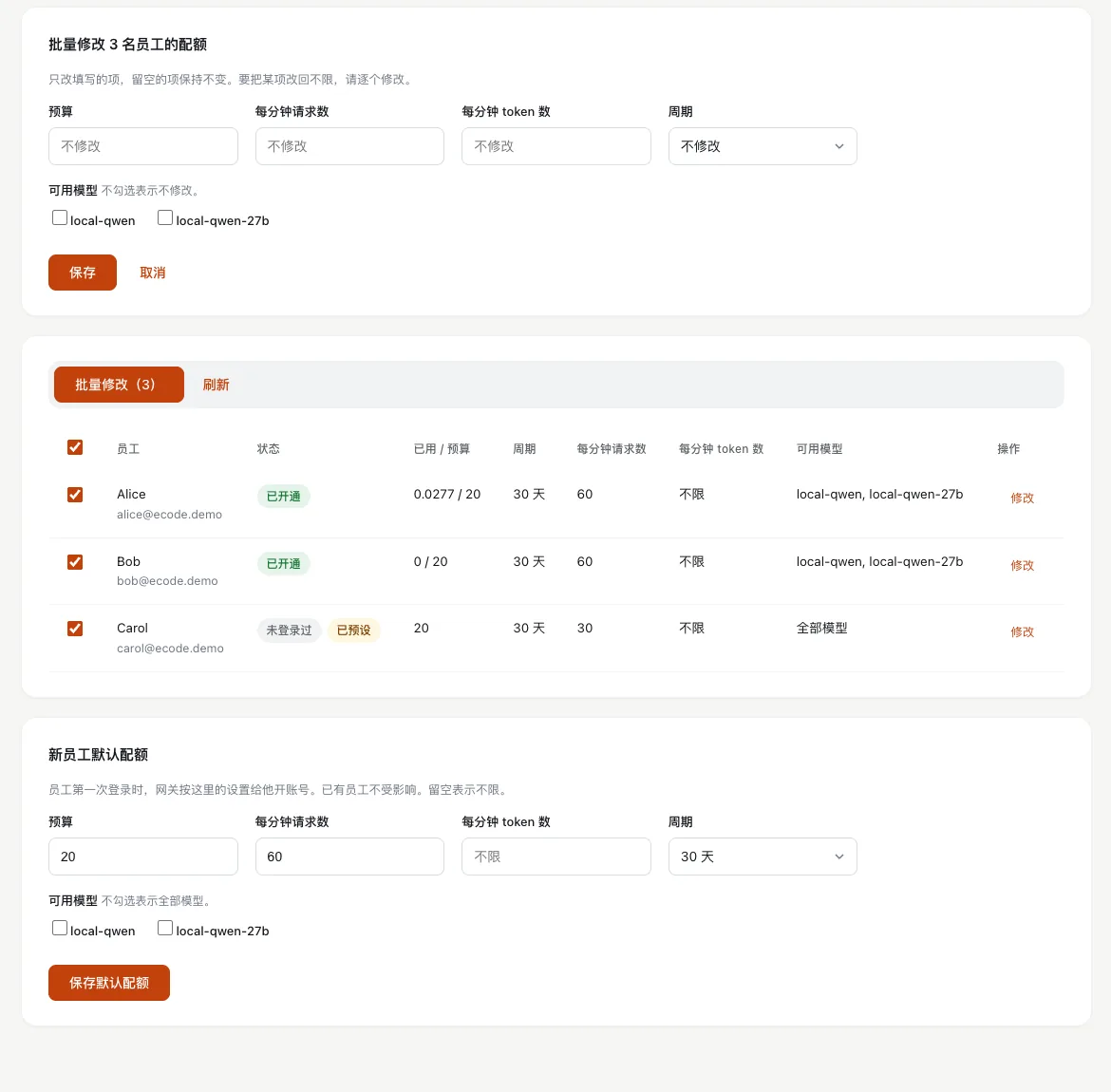
- 逐个修改或批量修改:勾选多位员工,只填要改的项,其余保持不变。
- 新员工默认配额:只影响以后第一次登录的员工。
- 预设:还没登录过的员工,可以先设好额度,在他第一次登录时生效。
- Edit one or many: select several employees and fill in only the fields you want to change.
- Defaults for new employees: apply to people who sign in for the first time from then on.
- Preset: set a quota for someone who has not signed in yet; it applies at their first sign-in.
| 设置Setting | 含义What it does | 默认值Default |
|---|---|---|
| 预算Budget | 一个周期内能用的额度单位。Quota units available in one period. | 20 |
| 周期Period | 预算多久重置一次。How often the budget resets. | 30 天30 days |
| 每分钟请求数Requests per minute | 每分钟最多调用模型几次,超过后网关返回 429。The most model calls per minute. Above it, the gateway returns 429. | 60 |
| 每分钟 token 数Tokens per minute | 每分钟最多处理多少 token。The most tokens processed per minute. | 不限Unlimited |
| 可用模型Allowed models | 员工能用哪些模型。不勾选表示全部模型。Which models the employee may use. None selected means all models. | 全部模型All models |
用量统计与请求日志Usage and the request log
-
用量统计Usage
按日期范围查看每人每天每个模型的汇总:请求数、token 数和花费。数据直接来自模型网关。员工配额页的「已用 / 预算」列显示每人当期用量。
Pick a date range to see a daily summary per employee and per model: requests, tokens and spend, read straight from the model gateway. The spend / budget column on the quota page shows each person's use this period.
-
请求日志Request log
每次请求一行:时间、员工、模型、输入和输出 token、花费、成功或失败、耗时,以及失败时的错误类型。可以按员工、模型、状态和日期筛选。日志从不显示对话内容。
One row per request: time, employee, model, prompt and completion tokens, spend, success or failure, latency, and the error type on failure. Filter by employee, model, status and date. The log never shows message content.
审计日志:谁在什么时候做了什么Audit log: who did what, and when
每行有时间、事件、结果、邮箱和详情。可以按事件类型筛选。
Each row has the time, event, result, email and details. Filter by event type.
- 管理员登录;员工登录和退出
- SSO 连接和邮箱域名变更
- 下载密钥签发和轮换
- 员工停用和启用
- 额度修改,含修改前后的值
- 本地模型启动和停止
- 模型与供应商的增删改,不含密钥
- Admin sign-in; employee sign-in and sign-out
- SSO connection and email domain changes
- Download keys issued and rotated
- Employees disabled and enabled
- Quota changes, with before and after values
- Local models started and stopped
- Models and providers added, changed or removed, without keys
系统设置Settings
-
SSO 连接SSO connection
接入企业身份源:通用 OIDC(公开客户端,PKCE)或 Microsoft Entra ID。用邮箱域名白名单控制谁能登录。设置在下次登录时生效。
Connect your identity provider: generic OIDC (public client with PKCE) or Microsoft Entra ID. An email domain allowlist controls who can sign in. Changes apply at the next sign-in.
-
品牌配置Brand configuration
维护员工看到的模型目录和显示名。客户端启动时拉取这份目录,改动不需要重新打包客户端。
Maintain the model catalog and the display names employees see. The client fetches the catalog at startup, so changes need no new client build.
-
管理员Administrators
管理控制台的管理员账号。只有管理员能使用管理页面。
Manage the Console's administrator accounts. Only administrators can use the admin pages.
版本发布与下载密钥Releases and download keys
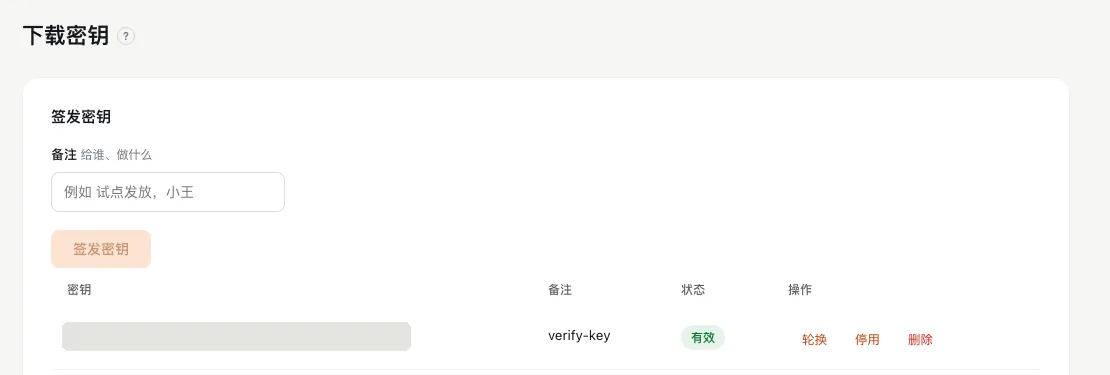
所有企业用同一个安装包。管理员在版本发布页上传 macOS 的 .dmg 和 Windows 的 .exe,控制台的下载页自动列出每个平台最新的文件。
Every enterprise uses the same installer. Upload the macOS .dmg and the Windows .exe on the Releases page, and the Console's download page lists the newest file for each platform.
- 下载密钥:写一条备注,签发密钥,通过企业内部渠道发给员工。员工验证密钥后,拿到一个约 10 分钟有效的下载链接。
- 轮换、停用、删除:轮换后旧值立即失效;停用可以再启用;删除永久失效。
- 连接信息:下载页同时显示企业码和一键连接按钮,员工装好客户端后直接连接。
- Download keys: add a note, issue a key, and share it through your internal channels. Once an employee verifies the key, they get a download link valid for about 10 minutes.
- Rotate, disable, delete: rotating invalidates the old value at once; a disabled key can be enabled again; deleting is permanent.
- Connect details: the download page also shows the enterprise code and a one-click connect button, so employees connect right after they install.
在你自己的环境里看一遍控制台See the Console in your own environment
我们带你走一遍部署、登录、配额和模型管理。
We will walk you through deployment, sign-in, quotas and model management.