ECode

ECode 企业 Agent 平台ECode enterprise agent platform

企业可以自己管理的混合算力 Agent 平台

The agent platformwith hybrid computethat you manage

连接本地 GPU 与云端模型,让每位员工通过统一入口使用 AI。控制台和模型网关部署在企业自己的机器或云上。

Connect local GPUs and cloud models, and give every employee one way in to AI. The Console and the model gateway run on your own box or cloud.
支持 macOS(Apple Silicon)与 Windows x64For macOS (Apple Silicon) and Windows x64

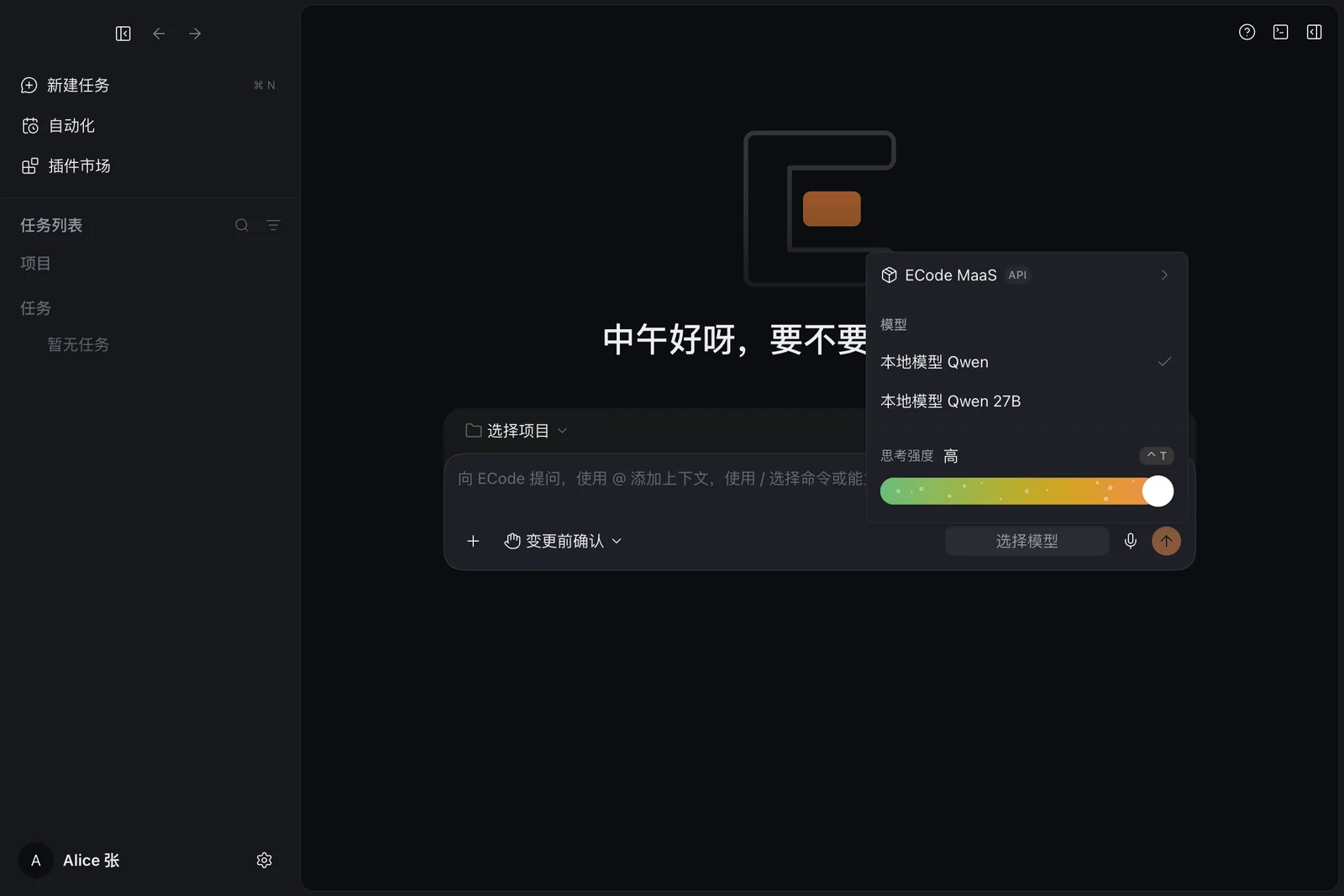
ECode 客户端的模型列表,列出本地模型 Qwen 和本地模型 Qwen 27B
ECode 客户端:本地模型和云端模型在同一个模型列表里The ECode client: local and cloud models in one model picker
  • 私有部署Private deployment企业自建,数据自控You host it and keep the data
  • 本地 + 云混合算力Local plus cloud compute本地 GPU 与云端模型统一接入Local GPUs and cloud models in one gateway
  • 企业单点登录Enterprise SSO通过 OIDC 用企业账号登录Sign in with enterprise accounts through OIDC
  • 按人计量Metered per person每人独立密钥、额度与用量An individual key, quota and usage for each person
01

从个人工作,到企业协同From one person's work to the whole enterprise

三个部分,一套平台:员工用的客户端,管理员用的控制台,连接所有模型的网关。

Three parts, one platform: the client employees use, the Console admins use, and the gateway that connects every model.

企业控制台Enterprise Console

企业自己部署,集中管理账号、模型与用量

Self-hosted; one place for accounts, models and usage
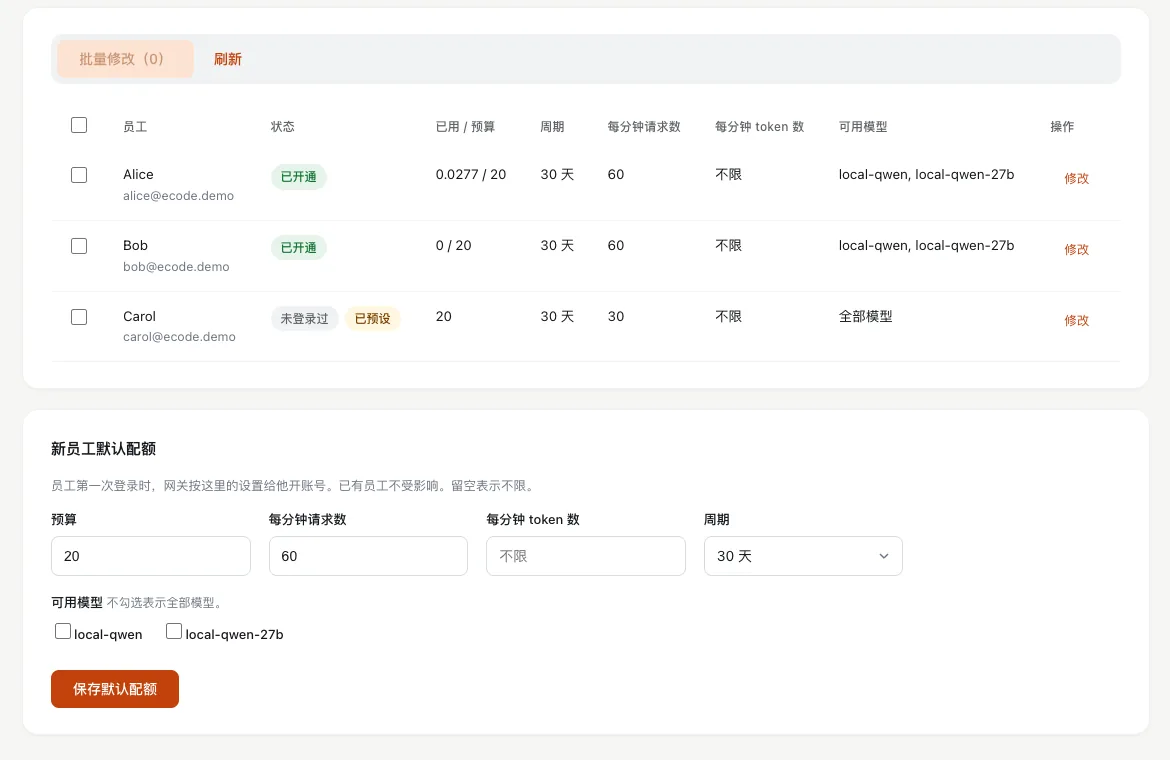
控制台的员工配额表,列出每位员工的状态、已用与预算、周期、每分钟请求数和可用模型
了解控制台About the Console

混合算力网关Hybrid-compute gateway

本地 GPU 与云端模型,统一接入

Local GPUs and cloud models behind one entry point

了解网关About the gateway
02

本地与云端,协同为企业所用Local and cloud, working together for you

模型统一接入,企业统一管理,员工统一使用。每位员工一把独立密钥,用量和额度按人计量。Models connect in one place, the enterprise manages them in one place, and employees use them from one place. Each employee has an individual key, and usage and quota are metered per person.

03

把能力,延伸到每一项工作Reach into every kind of work

客户端内置官方插件。除了读写代码、运行命令,也能做文档、表格、演示和 PDF。

Official plugins come built into the client. Beyond reading and writing code and running commands, it makes documents, spreadsheets, slides and PDFs.

  • 文档Documents制作 Word 文档Make Word documents
  • 表格Spreadsheets制作 Excel 表格Make Excel workbooks
  • 演示Slides制作 PowerPoint 演示文稿Make PowerPoint decks
  • PDF制作和预览 PDFMake and preview PDFs
  • 设计Design界面、网页和原型UI, web pages and prototypes
  • 浏览器自动化Browser automation打开、点击、截图、验证网页Open, click, capture and check pages

查看全部技能与插件See all skills and plugins

04

企业边界,始终由你掌握Your enterprise boundary stays in your hands

由企业部署控制台,统一管理身份、模型与使用策略。员工的模型请求只经过企业自己的网关。

You deploy the Console and manage identity, models and usage policy in one place. Employees' model requests pass only through your own gateway.

  • 企业单点登录Enterprise single sign-on员工用企业账号登录,支持通用 OIDC 和 Microsoft Entra ID。Employees sign in with their enterprise account, through generic OIDC or Microsoft Entra ID.
  • 按人配额与用量Per-person quota and usage为每位员工设置预算、周期和速率,按人、按模型查看用量。Set a budget, period and rate for each employee. See usage per person and per model.
  • 操作审计Audit log记录管理员和员工的关键操作,在控制台查看。Key admin and employee actions are recorded and shown in the Console.
  • 停用立即生效Disabling takes effect at once停用员工后,网关立即封禁这位员工的密钥。When you disable an employee, the gateway blocks that employee's key at once.

了解安全设计Read about security

按企业需要,选择部署方式Choose the deployment that fits

两种方式都由企业自己部署和管理。员工用的是同一个客户端。

You deploy and manage either shape yourself. Employees use the same client in both.

本地 + 云Local plus cloud

现场一台 GPU 主机,再接入云端模型

A GPU box on site, with cloud models added

纯云Cloud only

控制台和网关放在一台云服务器上,只接云端模型

The Console and gateway on one cloud VM, with cloud models only

比较两种部署方式Compare the two shapes