 ECode
macOS
Apple Silicon (arm64) · .dmg
- 文件File
- SHA256
下载Download
当前版本Current version 1.0.0。所有企业用同一个安装包,装好后输入企业码连接。. Every enterprise uses the same installer; connect with your enterprise code after you install.
Apple Silicon (arm64) · .dmg
x64 · .exe
员工也可以从企业控制台的下载页获取客户端,用管理员发的下载密钥验证。
Employees can also get the client from their Console's download page, using the download key their admin sends.
1.0 的安装包还没有代码签名,第一次打开时系统会拦截。按下面的步骤放行一次即可。放行前,建议先核对 SHA256。
The 1.0 installers are not code-signed yet, so the system blocks the first launch. Allow it once with the steps below. Check the SHA256 before you do.
macOS 14 及更早版本:在「应用程序」里按住 Control 键点按 ECode,选择「打开」。
macOS 14 and earlier: in Applications, Control-click ECode and choose Open.
在「终端」里核对 SHA256:Check the SHA256 in Terminal:
shasum -a 256 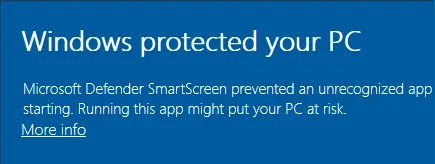
在 PowerShell 里核对 SHA256:Check the SHA256 in PowerShell:
Get-FileHash -Algorithm SHA256输入管理员给的企业码,或控制台地址。
Enter the enterprise code from your admin, or the Console URL.
核对企业名称和地址,点击连接。
Check the enterprise name and host, then click Connect.
用企业账号登录,开始工作。
Sign in with your enterprise account and get to work.