 ECode
本手册用到的名字Terms in this guide
- 盒子:装了 ECode 服务的那台设备。
<box-domain>:盒子的 HTTPS 域名。本手册的命令和地址里用它代替你的真实域名。- Console 地址:Console 的 HTTPS 地址,也就是
https://<box-domain>。员工可以用它把客户端连到这台盒子。 - 企业码:你的企业在 ECode 企业目录里的代码。员工输入它,客户端就能查到 Console 地址。
- 密钥文件:盒子上存放全部密码和密钥的文件
~/ecode-box/.env,权限是 600。
- Box. The device that runs the ECode services.
<box-domain>. The box's HTTPS domain. Commands and addresses in this guide use it in place of your real domain.- Console URL. The Console's HTTPS address,
https://<box-domain>. Employees use it to connect the client to this box. - Enterprise code. Your enterprise's code in the ECode enterprise directory. When an employee enters it, the client looks up your Console URL.
- Secrets file.
~/ecode-box/.envon the box. It holds every password and key, and its permissions are 600.
本手册不写任何密码。需要某个值时,在盒子上从密钥文件里读。例如 Console 管理员密码:
This guide contains no passwords. To get a value, read it from the secrets file on the box. For example, the Console admin password:
grep ^CONSOLE_ADMIN_PASSWORD= ~/ecode-box/.env | cut -d= -f2-没有实测的内容,正文里都已写明。
Anything we have not tested is marked as untested where it appears.
盒子上运行什么What runs on the box
盒子上运行四组服务,全部装在盒子的 ~/ecode-box/ 目录:
Four groups of services run on the box. All of them live under ~/ecode-box/:
| 服务Service | 作用What it does |
|---|---|
| ECode Console | 企业门户、企业登录、下载页The enterprise portal, enterprise sign-in and the download page |
| 模型网关和网关数据库Model gateway and gateway database | 员工密钥、额度、调用记录Employee keys, quotas and call records |
| 本地模型服务Local model service | 管理本地模型,启动和停止推理引擎Manages local models, and starts and stops the inference engine |
| 推理引擎Inference engine | 由本地模型服务按需启动Started on demand by the local model service |
安装前准备Before installation
1.0 没有参数化安装。ECode 团队逐台部署客户的盒子。部署前,确认以下条件都满足:
1.0 has no parameterized installer. The ECode team installs each customer's box. Before installation, make sure that:
- 盒子已接入企业内网。
- 盒子上已装容器运行时,容器能使用 GPU。
- 模型文件已经在盒子上。本地模型服务不负责下载模型。
- 推理引擎的镜像和程序已经在盒子上。
- 盒子根分区剩余空间不少于 20 GB。少于 20 GB 时,安装脚本拒绝启动服务。
- The box is on your private network.
- The box has a container runtime, and containers can use the GPU.
- The model files are already on the box. The local model service does not download models.
- The inference engine image and program are already on the box.
- The box's root partition has at least 20 GB free. With less, the install script refuses to start the services.
通过企业内网访问Access over your private network
盒子在企业内网里发布 HTTPS,证书由企业内网签发。这些地址只在企业内网里可达,没有对公网开放。
The box serves HTTPS on your private network, with a certificate that the private network issues. These addresses are reachable only inside your private network. They are not open to the internet.
| HTTPS 端口HTTPS port | 服务Service | 地址Address | 谁用Used by |
|---|---|---|---|
| 443 | ECode Console | https://<box-domain>/console/(管理后台) (admin)https://<box-domain>/about(下载页) (download page) | 管理员、员工Admins, employees |
| 8443 | 模型网关Model gateway | https://<box-domain>:8443(客户端调用) (client calls) | 员工客户端Employee clients |
每台要访问盒子的电脑,都要满足两个条件:
Every computer that needs to reach the box must meet two conditions:
- 接入盒子所在的企业内网。
- 使用企业内网的 DNS,能解析
<box-domain>。
- It is on the same private network as the box.
- It uses that network's DNS, so it can resolve
<box-domain>.
员工电脑同样要满足这两个条件,因为客户端直接访问 443 和 8443 端口。
Employee computers must meet both as well, because the client calls ports 443 and 8443 directly.
1.0 没有把「企业自己的域名和证书」做成产品功能。需要时,联系 ECode 团队在你的盒子上逐台配置。
1.0 does not offer your own domain and certificate as a product feature. If you need them, contact the ECode team to set them up on your box.
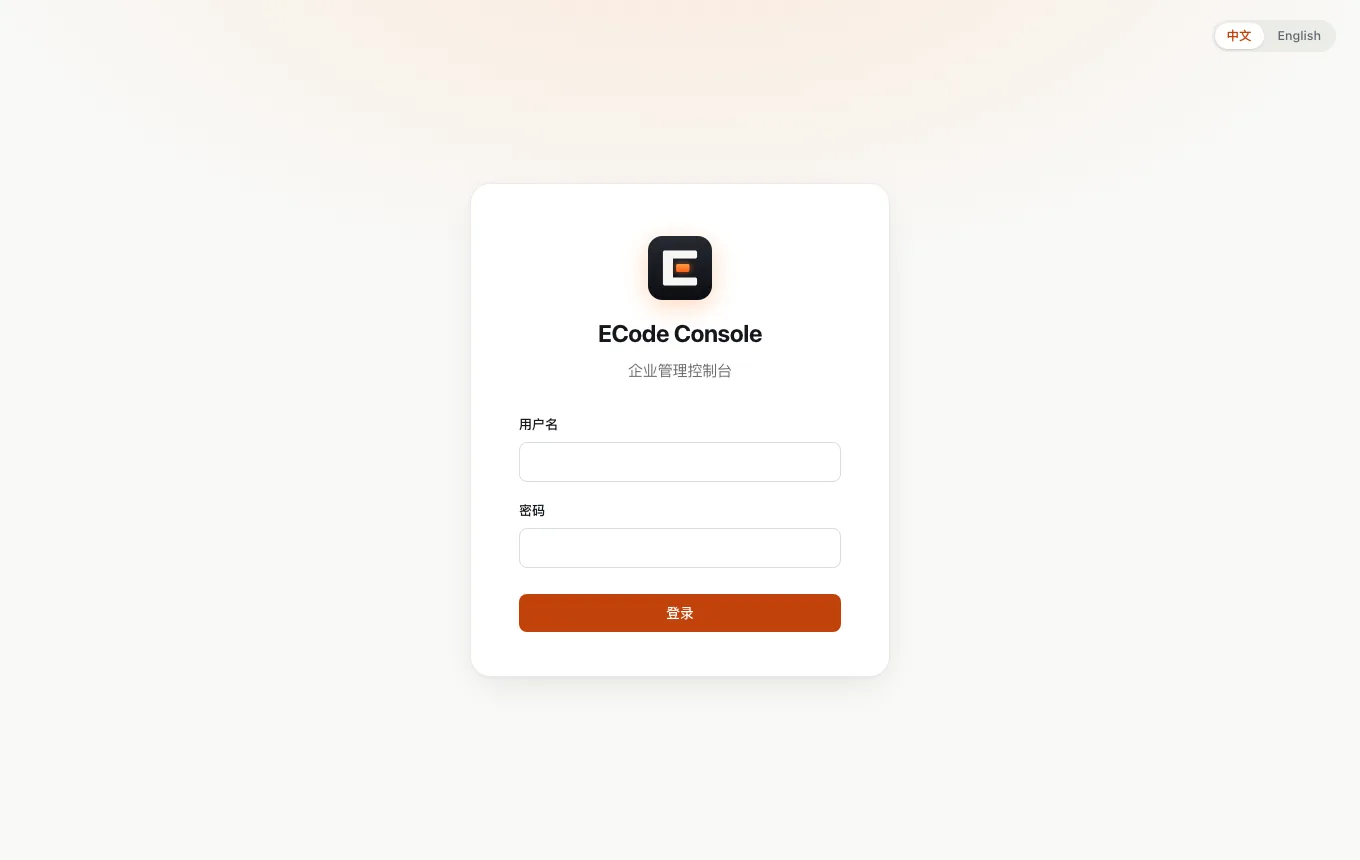
登录 Console,认识菜单Sign in to the Console
- 浏览器打开
https://<box-domain>/console/。 - 用户名填
admin。 - 密码填密钥文件里
CONSOLE_ADMIN_PASSWORD的值。 - 点击 登录。右上角可以切换 中文 和 English。
- Open
https://<box-domain>/console/in a browser. - Enter
adminas the username. - Enter the value of
CONSOLE_ADMIN_PASSWORDfrom the secrets file as the password. - Click Sign in. The switch in the top-right corner changes the Console between 中文 and English.
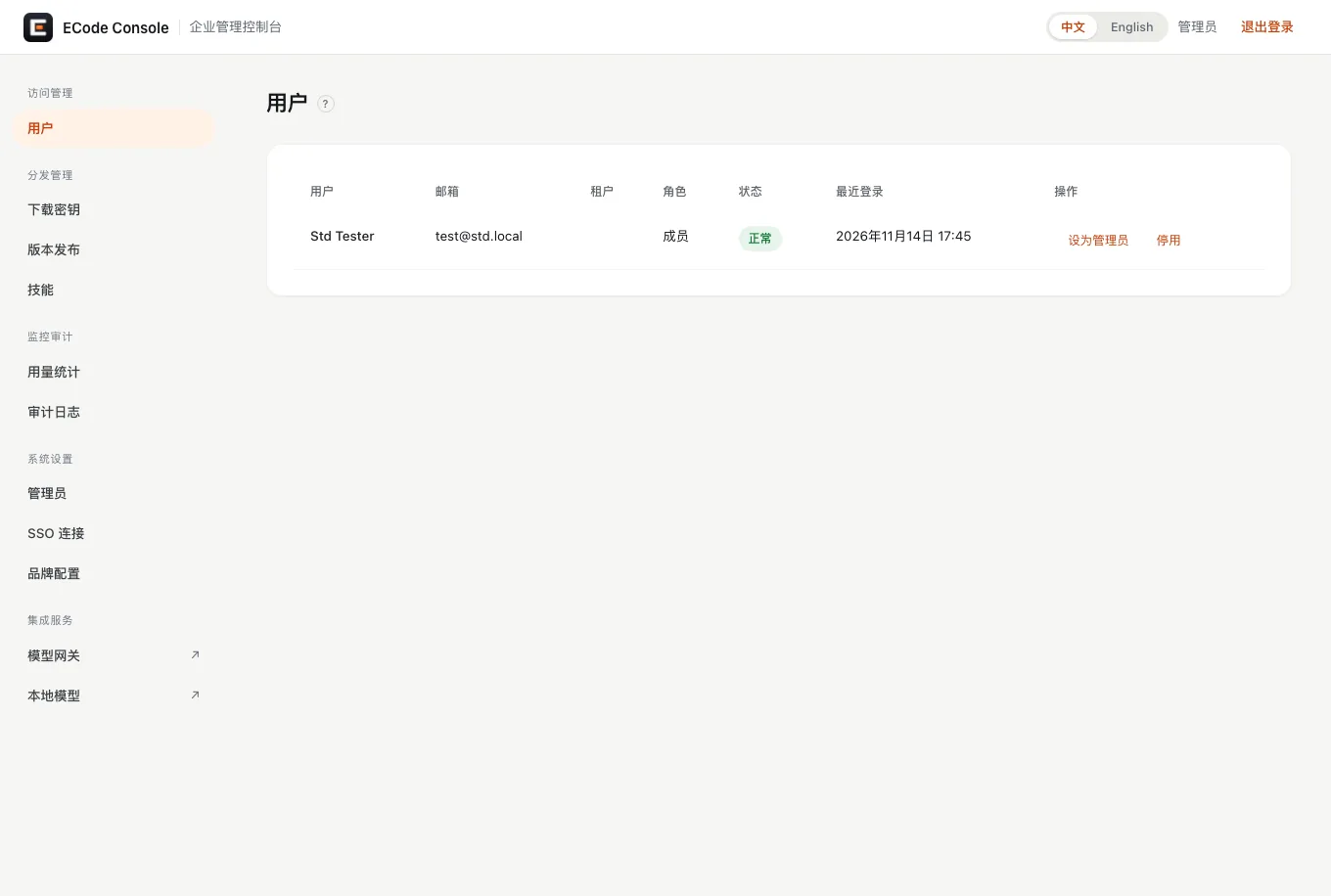
左侧菜单按分组排列。各项的用途如下:
The left menu is arranged in groups. Each item does the following:
- 访问管理 → 用户:所有用企业账号登录过的员工。可以停用、启用员工,或设为管理员。
- AI 资源 → 员工配额:每个员工在模型网关上的额度和可用模型。见添加员工和设置额度。
- AI 资源 → 本地模型:启动、停止本地模型,查看 GPU 和内存。见启动和停止本地模型。
- 分发管理 → 下载密钥:签发下载密钥。员工凭密钥在下载页下载客户端。见发放下载密钥。
- 分发管理 → 版本发布:上传客户端安装包。见上传客户端。
- 分发管理 → 技能:上传技能包。1.0 客户端只带内置技能,此页在 1.0 里不需要使用。
- 监控审计 → 用量统计:每个员工、每个模型、每天的请求数、token 数和花费。数据来自模型网关。见查看用量。
- 监控审计 → 审计日志:登录、退出、配置变更、额度变更、模型启停等事件。见审计日志。
- 系统设置 → 管理员:Console 管理员账号。超级管理员管账号和敏感设置,普通管理员做日常运维。
- 系统设置 → SSO 连接:企业身份源和允许登录的邮箱域名。见连接企业身份源。
- 系统设置 → 品牌配置:推送给客户端的模型目录:供应商名称、接口地址、默认模型、模型列表和显示名。客户端下次启动生效。
- Access → Users. Every employee who has signed in with an enterprise account. Disable or enable an employee, or promote one to admin.
- AI resources → Employee quotas. Each employee's quota and allowed models on the model gateway. See Add employees and Set quotas.
- AI resources → Local models. Start and stop local models, and watch GPU and memory use. See Start and stop local models.
- Distribution → Download Keys. Issue download keys. Employees enter a key on the download page to get the client. See Issue download keys.
- Distribution → Versions. Upload client installers. See Upload the client.
- Distribution → Skills. Upload skill packages. The 1.0 client ships with built-in skills only, so you do not need this page in 1.0.
- Monitor → Usage. Requests, tokens and spend per employee, per model, per day. The data comes from the model gateway. See Usage.
- Monitor → Audit Logs. Sign-ins, sign-outs, configuration changes, quota changes, model starts and stops, and other events. See Audit log.
- System → Administrators. Console admin accounts. Super admins manage accounts and sensitive settings. Regular admins handle day-to-day operations.
- System → SSO Connection. Your identity provider and the email domains allowed to sign in. See Connect your identity provider.
- System → Brand Config. The model catalog that the Console pushes to clients: provider name, endpoint URL, default model, model list and display names. Clients pick up changes at their next launch.
日常工作只用 Console 本身。
Day-to-day work happens in the Console itself.
连接企业身份源Connect your identity provider
员工用企业账号登录 ECode。登录时,客户端打开浏览器,浏览器先到 Console,Console 再跳到企业身份源。管理员要在 Console 的 SSO 连接 页配置这个身份源。
Employees sign in to ECode with their enterprise account. The client opens a browser, the browser goes to the Console, and the Console redirects to your identity provider. You set up that identity provider on the Console's SSO Connection page.
两种身份源都用同一个回调地址:
Both provider types use the same callback URL:
https://<box-domain>/sso/callbackConsole 自己也要能访问身份源的地址。身份源在企业内网时,确认盒子能连上它。
The Console itself must be able to reach your identity provider. If the identity provider sits on your internal network, make sure the box can connect to it.
通用 OIDC(公开客户端,PKCE)Generic OIDC (public client with PKCE)
这种方式已在参考设备上实测通过。
This method is tested on the reference device.
- 在企业身份源里注册一个公开客户端(public client)。打开 PKCE。不需要客户端密钥。
- 把回调地址设为
https://<box-domain>/sso/callback。 - 在 Console 打开 系统设置 → SSO 连接。
- 提供方类型 选 OIDC 公开客户端(PKCE)。
- 填写 颁发者(Issuer)、客户端 ID、授权地址、令牌地址、用户信息地址。这几个值在身份源的
/.well-known/openid-configuration里都能找到。 - 授权范围(Scopes) 填
openid profile email。 - 点击 保存连接。
- 在 邮箱域名白名单 里填企业邮箱域名,例如
example.com,点击 添加域名。
- In your identity provider, register a public client. Turn on PKCE. You do not need a client secret.
- Set the client's callback URL to
https://<box-domain>/sso/callback. - In the Console, open System → SSO Connection.
- Set Provider type to OIDC public client (PKCE).
- Fill in Issuer, Client ID, Authorize URL, Token URL and Userinfo URL. Your identity provider's
/.well-known/openid-configurationlists all of these values. - Set Scopes to
openid profile email. - Click Save connection.
- Under Email domain allowlist, enter your company email domain, such as
example.com, and click Add domain.
注意。访问控制 里的 允许自由登录 会让身份源里的任何账号都能登录,不再检查邮箱域名。正式环境保持关闭(严格模式)。
Caution. Allow free login under Access control lets any account in your identity provider sign in, with no email domain check. Keep it off (strict mode) in production.
改动在员工下次登录时生效。没写的字段使用服务器环境变量 SSO_* 里的默认值。
Changes apply at each employee's next sign-in. A field you leave empty falls back to the default in the server's SSO_* environment variables.
Microsoft Entra ID(机密客户端)Microsoft Entra ID (confidential client)
Console 已实现 Entra 方式,但参考设备上没有实测。按 Console 的字段,步骤如下:
The Console supports Entra ID, but it is untested on the reference device. Based on the Console's fields, the steps are:
- 在 Entra 管理中心注册一个应用,平台选 Web,回调地址填
https://<box-domain>/sso/callback。 - 为这个应用创建一个客户端密钥。
- 在 Console 的 SSO 连接 页,提供方类型 选 Entra(机密客户端)。
- 填写 客户端 ID 和 客户端密钥,点击 保存连接。
- In the Microsoft Entra admin center, register an app. Choose the Web platform and set the redirect URI to
https://<box-domain>/sso/callback. - Create a client secret for the app.
- On the Console's SSO Connection page, set Provider type to Entra (confidential).
- Fill in Client ID and Client secret, and click Save connection.
Entra 严格模式只放行允许列表里的租户 ID。Console 默认隐藏「租户」页。按 Console 代码,有两种配置方法,参考设备上都没有实测:
In strict mode, Entra sign-in admits only the tenant IDs on an allowlist. The Console hides its Tenants page by default. Based on the Console code, there are two ways to set the allowlist. Neither is tested on the reference device:
- 在
compose.yaml的 console 服务里设环境变量ALLOWED_TIDS=<tenant-id>=<name>,多个租户用逗号分隔。Console 启动时,如果租户列表为空,就写入这些值。 - 设环境变量
SHOW_TENANTS=true,重启 Console。左侧菜单出现 租户 页,在页面上添加。
- Set the environment variable
ALLOWED_TIDS=<tenant-id>=<name>on the console service incompose.yaml. Separate several tenants with commas. When the Console starts and its tenant list is empty, it writes these values to the list. - Set the environment variable
SHOW_TENANTS=trueand restart the Console. A Tenants page appears in the left menu. Add the tenants there.
添加员工,预设额度Add employees and preset quotas
Console 里没有「新建员工」按钮。员工第一次用企业账号登录 ECode 时,Console 自动做两件事:
The Console has no button to create an employee. The first time an employee signs in to ECode with an enterprise account, the Console does two things on its own:
- 在 用户 页建档。
- 在模型网关里给他开账号,按 新员工默认配额 设额度,并发一把只属于他的网关密钥。
- It adds the employee to the Users page.
- It opens an account for the employee on the model gateway, sets the quota from Defaults for new employees, and issues a gateway key that belongs to that employee alone.
所以添加员工只需要三步:
So adding an employee takes three steps:
- 在企业身份源里加这个人。
- 确认他的邮箱域名在 SSO 连接 → 邮箱域名白名单 里。
- 把下载页地址、下载密钥和企业码发给他,请他安装客户端、连接企业并登录。
- Add the person in your identity provider.
- Check that their email domain is in SSO Connection → Email domain allowlist.
- Send them the download page URL, a download key and the enterprise code. Ask them to install the client, connect to your enterprise and sign in.
在员工首次登录前预设额度Preset a quota before an employee's first sign-in
新员工的额度来自 员工配额 页底部的 新员工默认配额。要让一批新员工拿到不同于平时的额度,先改默认配额,等他们登录后再改回来。
A new employee's quota comes from Defaults for new employees at the bottom of the Employee quotas page. To give a group of new employees a different quota from usual, change the defaults first, and change them back after those employees have signed in.
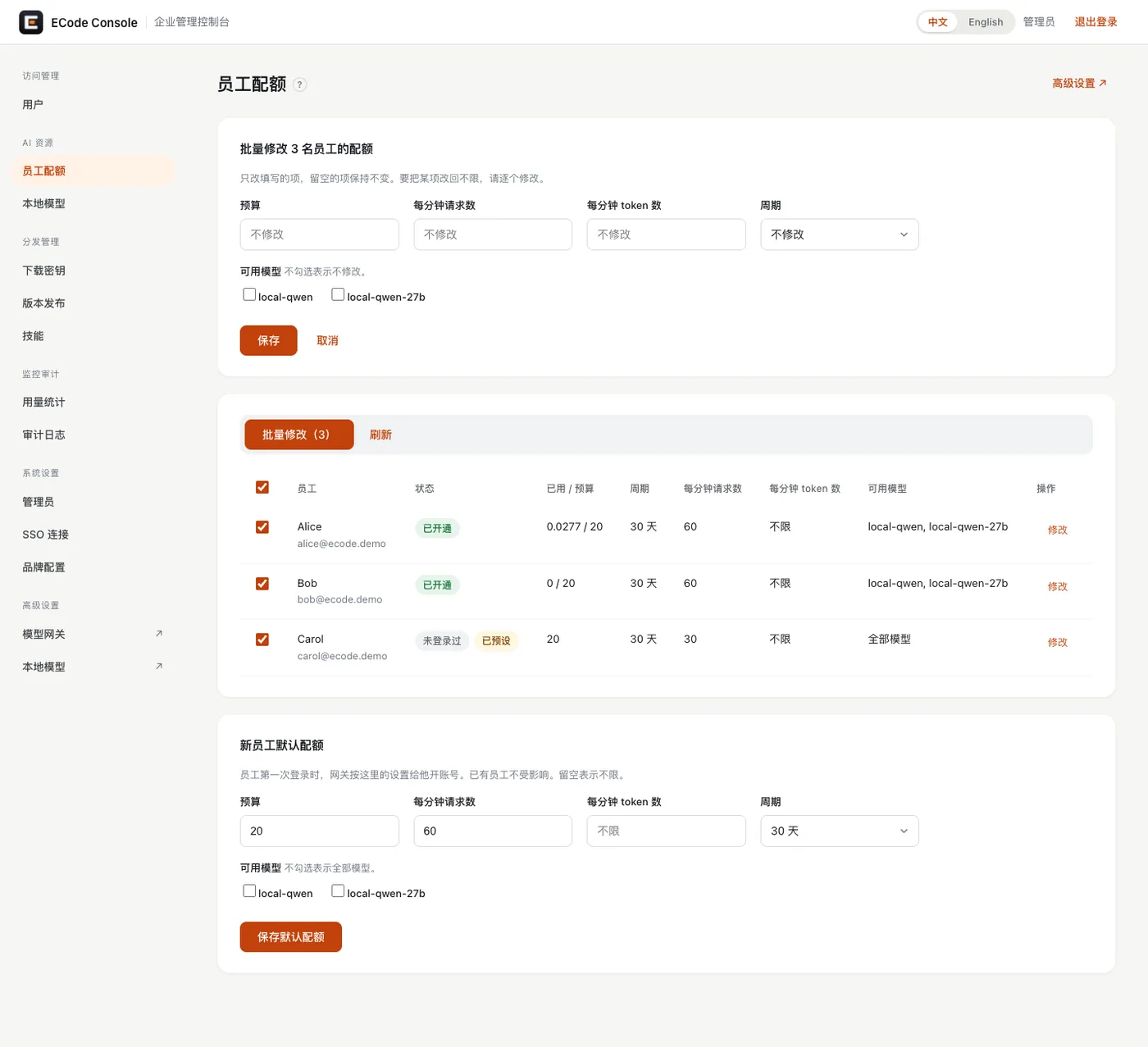
员工配额页上,状态为 未登录过 的员工,表示 Console 里有他、网关里还没有他。点 修改 设置的额度会标为 已预设,在他第一次登录时生效。
On the Employee quotas page, the status Never signed in means the Console knows the employee but the gateway does not yet. A quota you set for that employee with Edit shows as Preset and takes effect at their first sign-in.
员工从没登录过时,Console 里没有他,也就没法单独给他预设额度。按 Console 代码,员工登录时 Console 就在网关里给他开账号。所以 未登录过 只出现在 Console 里有记录、网关里还没有账号的员工身上,例如网关接入之前就登录过的员工。
An employee who has never signed in is not in the Console yet, so you cannot preset a quota for that one person. Based on the Console code, the Console opens the gateway account at sign-in. Never signed in therefore appears only for employees that the Console has a record of but the gateway has no account for, such as employees who signed in before the gateway was connected.
停用和启用员工Disable and enable an employee
- 打开 访问管理 → 用户。
- 在员工那一行点击 停用。他的网关密钥马上被封,再调用模型返回 401,也不能再登录。
- 要恢复时,点击 启用。
- Open Access → Users.
- Click Disable on the employee's row. Their gateway key is blocked at once. Model calls return 401, and the employee can no longer sign in.
- To restore access, click Enable.
设置额度和可用模型Set quotas and allowed models
打开 AI 资源 → 员工配额。每个员工有五项设置:
Open AI resources → Employee quotas. Each employee has five settings:
| 设置 | 含义 | 默认值 |
|---|---|---|
| 预算 | 一个周期内能用的额度单位。表格里的 已用 / 预算 显示当前用量。 | 20 |
| 周期 | 预算多久重置一次。 | 30 天 |
| 每分钟请求数 | 每分钟最多调用模型几次。超过后网关返回 429。 | 60 |
| 每分钟 token 数 | 每分钟最多处理多少 token。 | 不限 |
| 可用模型 | 员工能用哪些模型。不勾选表示全部模型。 | 全部模型 |
| Setting | Meaning | Default |
|---|---|---|
| Budget | The quota units available in one period. The Spend / budget column shows current use. | 20 |
| Period | How often the budget resets. | 30 days |
| Requests per minute | The most model calls allowed per minute. Above it, the gateway returns 429. | 60 |
| Tokens per minute | The most tokens processed per minute. | Unlimited |
| Allowed models | The models the employee can use. Leave all unchecked to allow every model. | All models |
本地模型不花钱。额度单位是内部计量单位,只用来限量。本地模型按每百万 token 计价:输入 0.2 单位,输出 0.8 单位。参考设备上的云端模型是输入 2 单位、输出 8 单位,为本地模型的 10 倍。预算 20 大约等于 1 亿输入 token,或 2500 万输出 token。
Local models cost nothing. The quota unit is an internal unit that exists only to limit use. Local models are priced per million tokens at 0.2 units for input and 0.8 units for output. Cloud models on the reference device cost 2 units for input and 8 for output, 10 times the local rate. A budget of 20 is about 100 million input tokens, or 25 million output tokens.
在参考设备上,一次智能体对话请求约 2.5 万输入 token,约耗 0.005 单位。按此推算,只用本地模型时,预算 20 大约够 3800 次模型调用。一个任务通常包含多次调用。这是估算,不是实测上限。
On the reference device, one agent chat request carries about 25,000 input tokens and costs about 0.005 units. At that rate, a budget of 20 covers about 3,800 model calls on local models alone. One task usually makes several calls. This is an estimate, not a measured limit.
修改一个员工Edit one employee
- 在员工那一行点击 修改。
- 改预算、周期、请求数、token 数或可用模型。
- 点击 保存。改动直接写到网关,并记入审计日志。
- Click Edit on the employee's row.
- Change the budget, period, requests per minute, tokens per minute or allowed models.
- Click Save. The change goes straight to the gateway and into the audit log.
批量修改Edit several employees at once
- 勾选多个员工,点击 批量修改(n)。
- 只填要改的项。留空的项保持不变。
- 点击 保存。页面提示网关更新了几人、预设了几人、失败了几人。
- Select several employees and click Edit selected (n).
- Fill in only the settings you want to change. Settings you leave empty stay as they are.
- Click Save. The page reports how many employees the gateway updated, how many it preset, and how many failed.
批量修改不能把某一项改回「不限」。要改回不限,逐个修改。
A bulk edit cannot set a value back to unlimited. To do that, edit each employee on their own.
修改新员工默认配额Change the defaults for new employees
- 在员工配额页底部,找到 新员工默认配额。
- 填预算、每分钟请求数、每分钟 token 数、周期,勾选可用模型。留空表示不限。
- 点击 保存默认配额。只影响以后第一次登录的员工。
- At the bottom of the Employee quotas page, find Defaults for new employees.
- Fill in the budget, requests per minute, tokens per minute and period, and check the allowed models. An empty field means unlimited.
- Click Save defaults. This affects only employees who sign in for the first time after the change.
默认配额的初始值来自 compose.yaml 里 console 服务的环境变量:GATEWAY_DEFAULT_MAX_BUDGET、GATEWAY_DEFAULT_BUDGET_DURATION、GATEWAY_DEFAULT_RPM、GATEWAY_DEFAULT_TPM、GATEWAY_DEFAULT_MODELS。
The initial defaults come from these environment variables on the console service in compose.yaml: GATEWAY_DEFAULT_MAX_BUDGET, GATEWAY_DEFAULT_BUDGET_DURATION, GATEWAY_DEFAULT_RPM, GATEWAY_DEFAULT_TPM and GATEWAY_DEFAULT_MODELS.
员工能看到的模型列表The model list employees see
员工客户端里的模型列表来自 品牌配置 的模型目录。员工实际能调用哪些模型,由 可用模型 决定。两边要一致:目录里有、员工又被允许的模型,员工才能正常使用。
The model list in an employee's client comes from the model catalog in Brand Config. The models an employee can actually call depend on Allowed models. Keep the two consistent. An employee can use a model only when it is in the catalog and allowed for that employee.
新增模型(例如云端模型)要改三处:本地模型服务的部署或模型网关的路由、品牌配置的模型目录、员工的可用模型。参考设备按这三处配置了三个云端模型。网关用密钥文件里的接口密钥把它们的调用转发到云端。品牌配置里,它们的显示名带「(云端)」。
Adding a model, such as a cloud model, means changing three places: the deployment in the local model service or the routing in the model gateway, the model catalog in Brand Config, and each employee's allowed models. The reference device has three cloud models set up this way. The gateway forwards their calls to the cloud with an API key from the secrets file. In Brand Config, their display names end in 「(云端)」, which means "cloud".
接口地址要和接口格式配套。格式选 Anthropic 兼容时,接口地址写到网关根,例如 https://<box-domain>:8443,客户端自己补 /v1/messages。格式选 OpenAI 兼容时,接口地址要带 /v1,例如 https://<gateway-domain>/v1,客户端只补 /chat/completions。少了 /v1,员工发消息会立刻报「Model request failed.」。
Match the endpoint URL to the API format. For the Anthropic-compatible format, point the endpoint URL at the gateway root, such as https://<box-domain>:8443. The client appends /v1/messages. For the OpenAI-compatible format, include /v1, such as https://<gateway-domain>/v1. The client appends only /chat/completions. Without /v1, employees get "Model request failed." as soon as they send a message.
启动和停止本地模型Start and stop local models
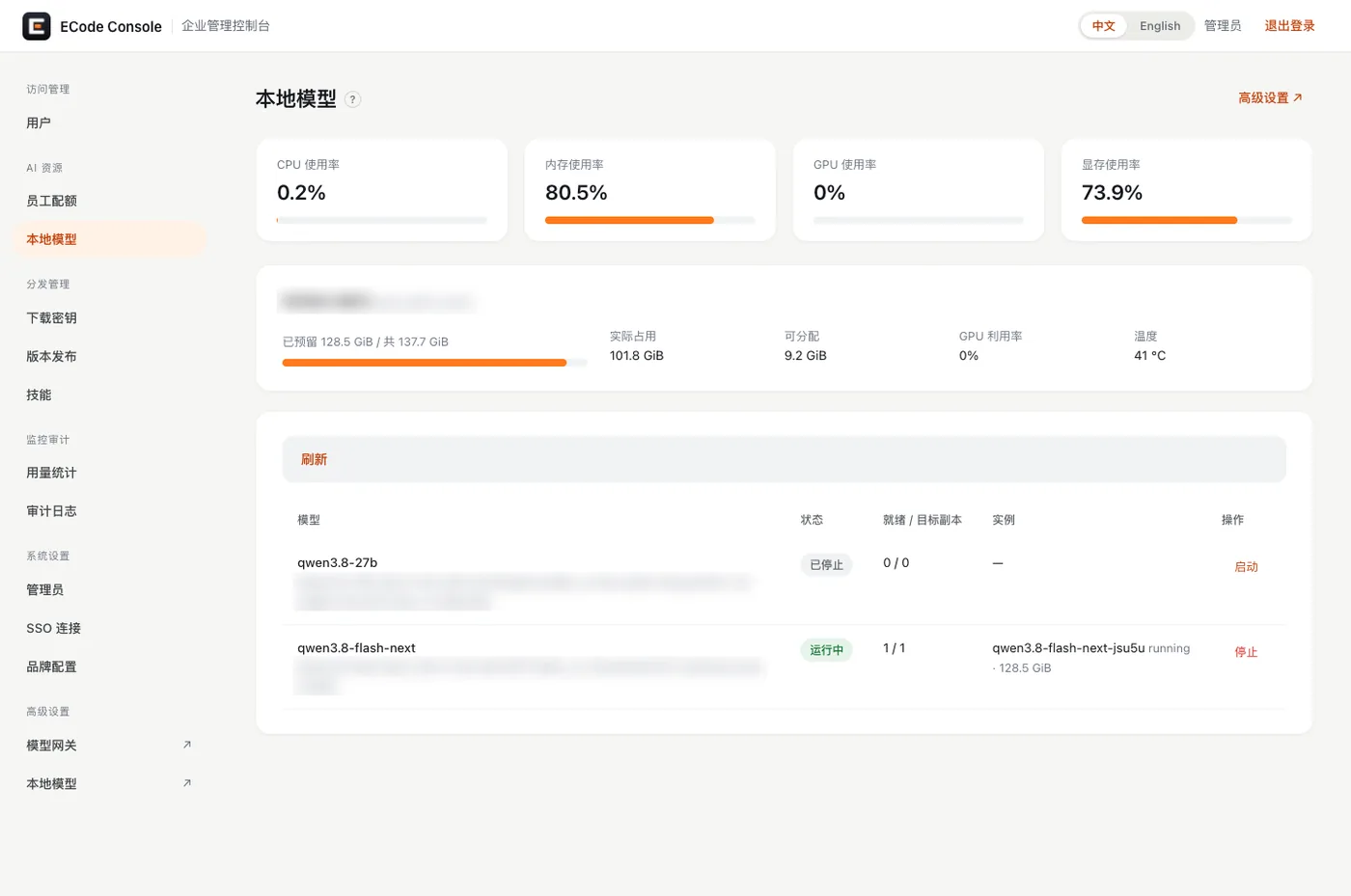
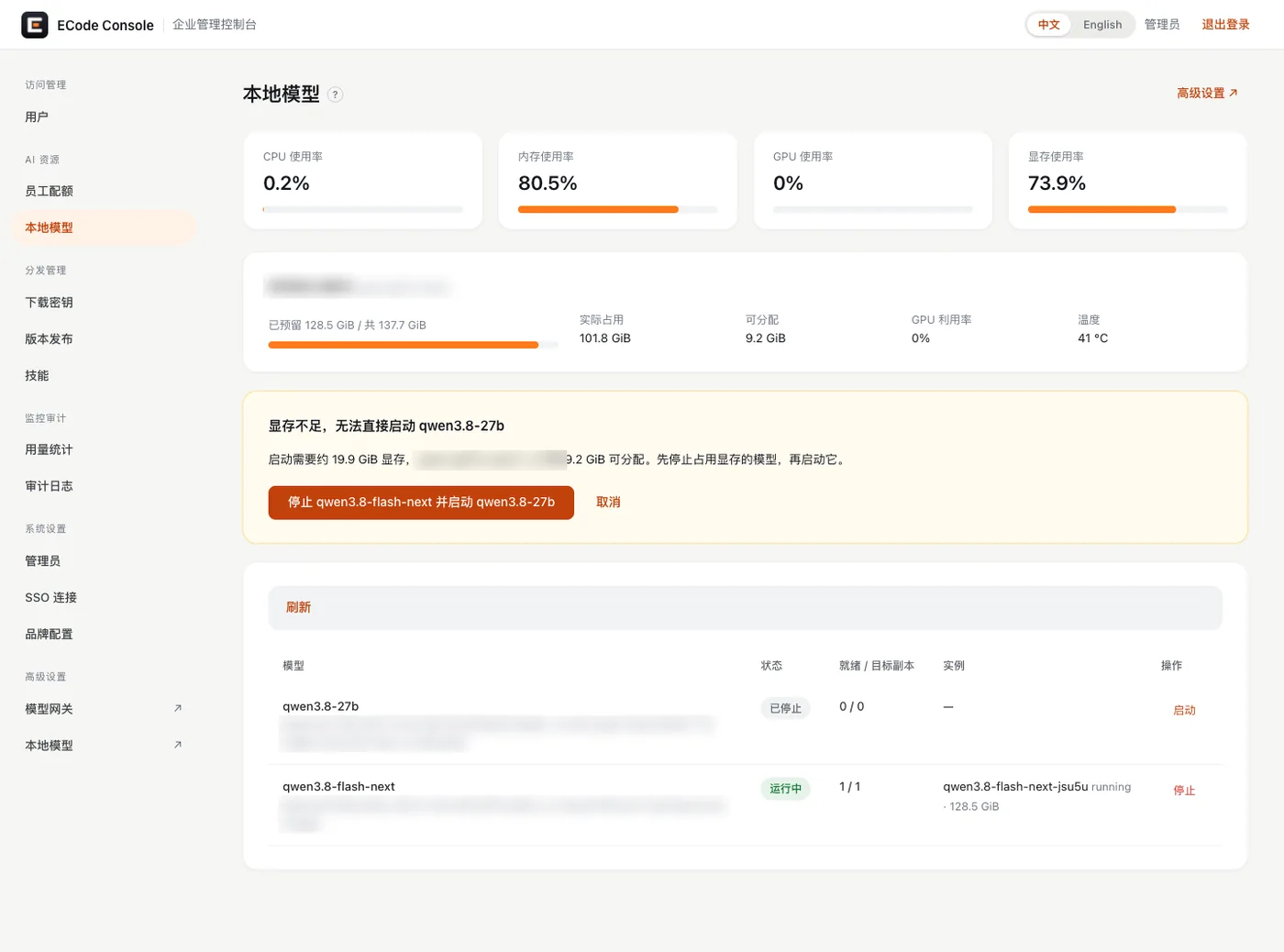
打开 AI 资源 → 本地模型。页面上方是 CPU、内存、GPU 和显存使用率。中间是 GPU 卡片:已预留、实际占用、可分配、温度。下方是模型列表。
Open AI resources → Local models. The top of the page shows CPU, memory, GPU and GPU memory use. Below that is a card for the GPU, with reserved memory, memory in use, memory free to allocate, and temperature. The model list is at the bottom.
| 本地模型服务里的模型名Name in the local model service | 员工看到的模型Model employees see | 说明Notes |
|---|---|---|
qwen3.8-flash-next | local-qwen | 主模型。约占 86 GiB。上下文 262144 token。The main model. Takes about 86 GiB. Context of 262,144 tokens. |
qwen3.8-27b | local-qwen-27b | 第二路由,按需启动。The second route, started on demand. |
- 在要启动的模型那一行点击 启动。状态先变为 启动中,就绪后变为 运行中。
- 要停止时,点击 停止。
- 点击 刷新 查看最新状态。
- Click Start on the model's row. The status changes to Starting, then to Running when the model is ready.
- To stop the model, click Stop.
- Click Refresh to see the latest status.
内存冲突是什么意思What the memory conflict notice means
参考设备的 CPU 和 GPU 共用一块内存。Flash Next 一个模型就占约 86 GiB,两个模型放不下。启动一个模型时,如果可分配的显存不够,页面不直接启动,而是显示黄色提示:
On the reference device, the CPU and the GPU share one pool of memory. Flash Next alone takes about 86 GiB, so the two models do not fit together. If you start a model and there is not enough GPU memory free to allocate, the page does not start it. It shows a yellow notice instead:
显存不足,无法直接启动 qwen3.8-27b
启动需要约 19.9 GiB 显存,<gpu> 上只剩 9.2 GiB 可分配。先停止占用显存的模型,再启动它。
Not enough GPU memory to start qwen3.8-27b
It needs about 19.9 GiB of GPU memory, and <gpu> has 9.2 GiB free. Stop the model that holds the memory, then start this one.
这时有两个选择:
You then have two choices:
- 点击 停止 qwen3.8-flash-next 并启动 qwen3.8-27b,一步完成切换。
- 点击 取消,保持现状。
- Click Stop qwen3.8-flash-next and start qwen3.8-27b to switch in one step.
- Click Cancel to leave things as they are.
注意。切换模型时,正在用旧模型的员工会收到错误。尽量在没人用的时候切换。
Caution. When you switch models, employees who are using the old model get errors. Switch when nobody is using it, if you can.
模型启动要时间,27B 加载后还要校准。另外,盒子上的其他程序也占内存。可用内存不要低于 15 GiB,在盒子上用 free -g 查看。
Models take time to start, and 27B also calibrates after it loads. Other programs on the box use memory too. Keep at least 15 GiB of memory available. Check it on the box with free -g.
设置企业名称和企业码Set the enterprise name and code
1.0 起,所有企业用同一个客户端安装包。安装包里没有 Console 地址。员工第一次打开 ECode 时,输入企业码或 Console 地址,把客户端连到这台盒子的 Console。为此要做三件事:
From 1.0 on, every enterprise uses the same client installer. The installer contains no Console URL. When employees open ECode for the first time, they enter the enterprise code or the Console URL to connect the client to this box's Console. To make that work, do three things:
- 在 Console 上设置企业名称和企业码。
- 联系 ECode 团队登记企业码。
- 把企业码和下载页地址发给员工。下载页上还有一键连接链接。
- Set the enterprise name and code on the Console.
- Contact the ECode team to register your enterprise code.
- Send employees the enterprise code and the download page URL. The download page also has a one-click connect link.
在 Console 上设置Set them on the Console
下面四项是 compose.yaml 里 console 服务的环境变量。它们由 ECode 团队在部署盒子时设置。要修改时,联系 ECode 团队。
The four settings below are environment variables on the console service in compose.yaml. The ECode team sets them when it installs the box. To change them, contact the ECode team.
| 变量 | 作用 | 不设置时 |
|---|---|---|
PUBLIC_BASE_URL | Console 地址,例如 https://<box-domain>。一键连接链接和登录回调地址都用它。 | http://localhost:8011,员工无法连接。 |
CONSOLE_NAME | 企业名称。Console 在 /api/enterprise 返回它。客户端在确认企业页面和登录卡片上显示它。Console 的企业登录页和欢迎页也显示它。 | ECode Console |
ENTERPRISE_CODE | 企业码。下载页显示它。必须和 ECode 团队登记的企业码一致。 | 空。下载页不显示企业码。 |
DEEP_LINK_SCHEME | 客户端的链接协议,值为 ecode。一键连接链接和登录后跳回客户端都用它。 | 默认值不是 ecode。ECode 打不开这样的链接。 |
| Variable | What it does | If not set |
|---|---|---|
PUBLIC_BASE_URL | The Console URL, such as https://<box-domain>. The one-click connect link and the sign-in callback URL both use it. | http://localhost:8011. Employees cannot connect. |
CONSOLE_NAME | The enterprise name. The Console returns it at /api/enterprise. The client shows it on the confirm-enterprise screen and the sign-in card. The Console's enterprise sign-in page and welcome page show it too. | ECode Console |
ENTERPRISE_CODE | The enterprise code. The download page shows it. It must match the code the ECode team registered. | Empty. The download page shows no enterprise code. |
DEEP_LINK_SCHEME | The client's link scheme, ecode. The one-click connect link and the return to the client after sign-in both use it. | A default other than ecode. ECode cannot open those links. |
检查企业名称:
To check the enterprise name, run:
curl -s https://<box-domain>/api/enterprise正常时返回:
A correct setup returns:
{"schema":1,"name":"<enterprise-name>","product":"ECode"}较早版本的 Console 没有 /api/enterprise,客户端会提示「这个地址不是 ECode 企业控制台」。
Older Console versions have no /api/enterprise, and the client then reports that the address is not an ECode Console.
注意。DEEP_LINK_SCHEME 必须是 ecode。设成别的值时,下载页上的一键连接链接打不开 ECode,员工登录后浏览器也跳不回 ECode。
Caution. DEEP_LINK_SCHEME must be ecode. With any other value, the one-click connect link on the download page cannot open ECode, and the browser cannot return employees to ECode after they sign in.
登记企业码Register the enterprise code
客户端靠 ECode 企业目录查找企业码。企业目录由 ECode 团队维护。联系 ECode 团队登记企业码。登记需要三项信息:
The client looks up enterprise codes in the ECode enterprise directory, which the ECode team maintains. Contact the ECode team to register your code. Registration needs three items:
- 企业码:2 到 32 位小写字母、数字或连字符,首位不能是连字符。登记后不能修改。
- 企业名称:和
CONSOLE_NAME相同。客户端显示的是 Console 返回的名字,两边一致可以避免混淆。 - Console 地址:
PUBLIC_BASE_URL的值。它必须以https://开头。
- Enterprise code. 2 to 32 lowercase letters, digits or hyphens, not starting with a hyphen. You cannot change it after registration.
- Enterprise name. The same as
CONSOLE_NAME. The client shows the name that the Console returns, so matching names avoid confusion. - Console URL. The value of
PUBLIC_BASE_URL. It must start withhttps://.
登记后,检查目录记录:
After registration, check the directory record:
curl -s https://content.ecode.astrifer.ai/directory/v1/<enterprise-code>.json正常时返回一行 JSON,含 "code"、"name"、"console_url" 和 "updated_at"。
A correct record returns one line of JSON with "code", "name", "console_url" and "updated_at".
企业码停用或删除后,企业目录里没有这条记录。员工再输入这个企业码,客户端提示「找不到这个企业码」。已经连接的客户端保存的是 Console 地址,不再查企业目录。
Once a code is disabled or deleted, the directory no longer has its record. An employee who enters that code then sees "No enterprise has this code." Clients that are already connected store the Console URL and no longer query the directory.
没有互联网的私有部署不需要登记企业码。员工输入 Console 地址,或用一键连接链接。1.0 安装包打开企业码查找,也没有内置 Console 地址。
A private deployment with no internet access does not need a registered code. Employees enter the Console URL or use the one-click connect link. The 1.0 installer has enterprise code lookup turned on and has no built-in Console URL.
员工在下载页看到什么What employees see on the download page
下载页 https://<box-domain>/about 的密钥输入框下方是 已安装客户端? 一栏。它有两部分:
On the download page, https://<box-domain>/about, an Already installed? block sits below the key field. It has two parts:
- 按钮 在客户端中连接本企业。它是一键连接链接
ecode://connect?console=<url-encoded-console-url>。 - 一行说明「或在客户端的“连接企业”中输入:」,下面是 控制台地址 和 企业码。没有设置
ENTERPRISE_CODE时,不显示企业码。
- The Connect the client to this enterprise button. It is the one-click connect link
ecode://connect?console=<url-encoded-console-url>. - The line "Or enter this in the client under Connect enterprise:", followed by the Console URL and the Enterprise code. If
ENTERPRISE_CODEis not set, the enterprise code does not appear.
一键连接链接只把 Console 地址填进客户端的连接企业页面。员工仍要点击 下一步,核对企业名称,再点击 连接。员工已登录时,客户端先问是否切换企业。你也可以把 ecode://connect?code=<enterprise-code> 这样的链接直接发给员工。
The one-click connect link only fills the Console URL into the client's connect screen. The employee still clicks Continue, checks the enterprise name, and clicks Connect. If the employee is already signed in, the client first asks whether to switch enterprise. You can also send employees a link such as ecode://connect?code=<enterprise-code>.
上传客户端,发放下载密钥Upload the client and issue download keys
1.0 起,所有企业用同一个安装包。安装包里没有 Console 地址,可以上传到任何一台盒子。员工安装后自己连接企业,见设置企业名称和企业码。
From 1.0 on, every enterprise uses the same installer. It contains no Console URL, so you can upload it to any box. Employees connect to your enterprise themselves after they install. See Set the enterprise name and code.
上传安装包Upload an installer
- 打开 分发管理 → 版本发布。
- 发布通道 保持页面上的默认值。参考设备上是
enterprise。 - 点击 选择文件,或把文件拖进虚线框。Mac 选
.dmg,Windows 选.exe。 - 点击 上传。不需要重启服务。
- 打开下载页,确认出现对应的下载按钮:
- Open Distribution → Versions.
- Leave Channel at the page's default. On the reference device it is
enterprise. - Click Choose files, or drag the file into the dashed box. Use the
.dmgfor Mac and the.exefor Windows. - Click Upload. You do not need to restart any service.
- Open the download page and check that the matching download button appears:
| 文件File | 下载页显示The download page shows |
|---|---|
.dmg,文件名带 arm64A .dmg with arm64 in the file name | macOS · Apple Silicon |
.exe,文件名不带 arm64An .exe without arm64 in the file name | Windows · x64 |
每个平台只显示最新上传的那个文件。参考设备上已上传 ECode-3.18.2-mac-arm64.dmg 和 ECode-3.18.2-win-x64.exe,下载页列出了这两项。
Each platform shows only the most recently uploaded file. The reference device has ECode-3.18.2-mac-arm64.dmg and ECode-3.18.2-win-x64.exe uploaded, and its download page lists both.
1.0 关闭了自动更新,所以不需要上传 latest-mac.yml、latest.yml 和 .blockmap。页面提示里列出了这些文件,是给自动更新用的。不上传 .yml 时,下载页不显示版本号,这是正常的。
1.0 has auto-update turned off, so you do not need to upload latest-mac.yml, latest.yml or .blockmap files. The page hint lists them because auto-update uses them. Without a .yml file, the download page shows no version number. This is expected.
签发下载密钥Issue a download key
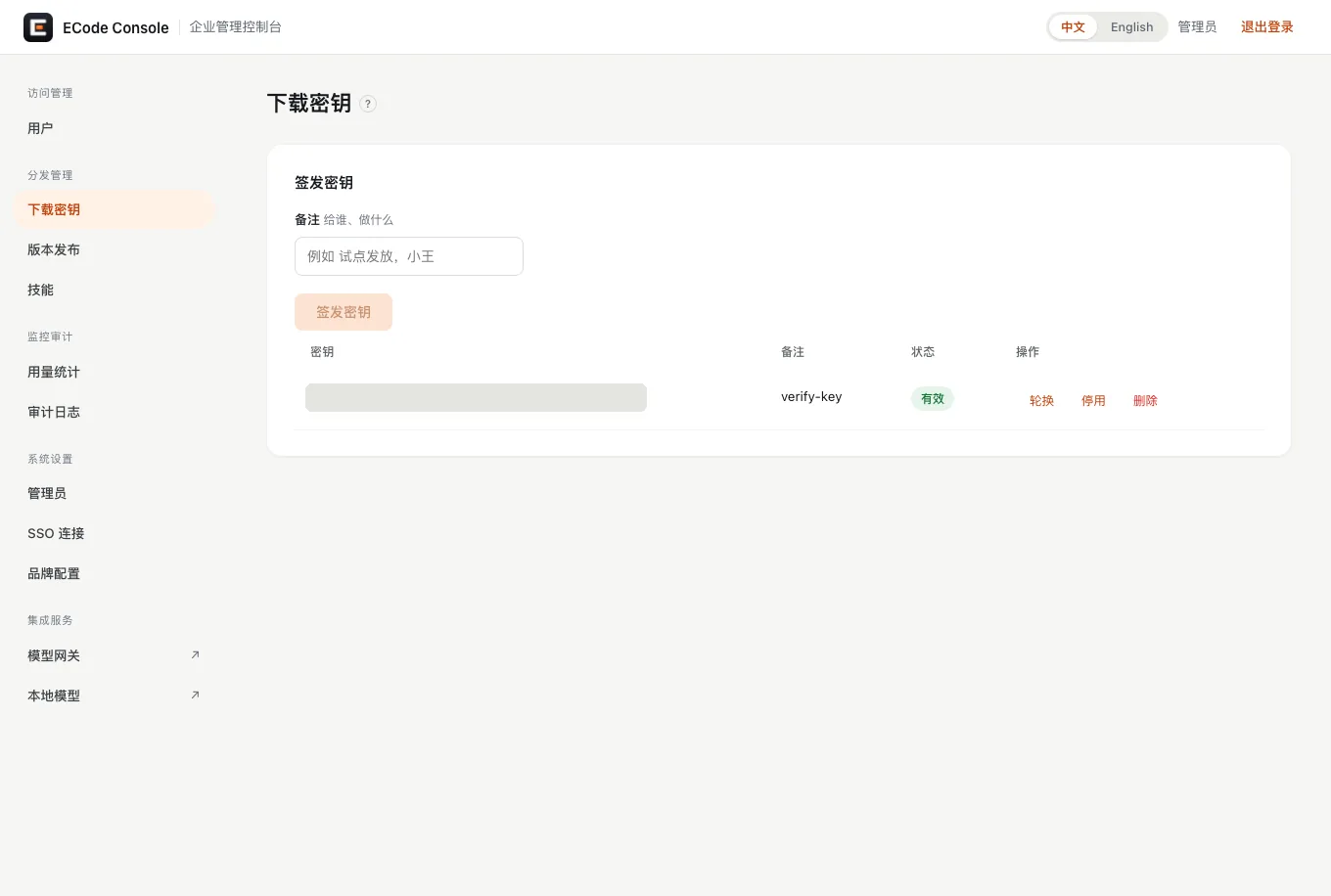
- 打开 分发管理 → 下载密钥。
- 在 备注 里写给谁、做什么,例如「研发一部试点」。
- 点击 签发密钥。新密钥出现在下方列表。
- 复制密钥(以
zdkey_开头),通过企业内部渠道发给员工,同时发下载页地址https://<box-domain>/about和企业码。
- Open Distribution → Download Keys.
- Under Label, note who the key is for and why, such as "R&D team 1 pilot".
- Click Issue key. The new key appears in the list below.
- Copy the key (it starts with
zdkey_) and send it to employees through an internal channel, together with the download page URLhttps://<box-domain>/aboutand the enterprise code.
一把密钥可以多次使用,直到它被轮换、停用或删除。员工每次验证密钥,下载页给他一个约 10 分钟有效的签名下载链接。密钥错误时,下载页拒绝下载(401)。
A key works any number of times until you rotate, disable or delete it. Each time an employee verifies a key, the download page gives them a signed download link that is valid for about 10 minutes. With a wrong key, the download page refuses the download (401).
| 操作Action | 效果Effect |
|---|---|
| 轮换Rotate | 生成新的密钥值,旧值立即失效。Generates a new key value. The old value stops working at once. |
| 停用Disable | 密钥暂时失效,可以再启用。The key stops working until you enable it again. |
| 删除Delete | 密钥永久失效。The key stops working for good. |
查看用量和审计日志Review usage and the audit log
用量Usage
- 每人用了多少,看 员工配额 页的 已用 / 预算 列。数据直接来自网关。
- 每人每天每个模型的汇总,看 监控审计 → 用量统计 页。数据从模型网关读取,按 UTC 日期分组。每行有员工、模型、请求数、token 数和花费。
- To see how much each employee has used, check the Spend / budget column on the Employee quotas page. The data comes straight from the gateway.
- For totals per employee, per model, per day, open Monitor → Usage. The page reads from the model gateway and groups by UTC date. Each row shows the employee, model, request count, token count and spend.
审计日志Audit log
- 打开 监控审计 → 审计日志。
- 在顶部下拉框选择事件类型,或保持 全部事件。
- 每行有时间、事件、结果、邮箱和详情。
- Open Monitor → Audit Logs.
- Pick an event type in the drop-down at the top, or leave it at All events.
- Each row shows the time, event, result, email and details.
Console 记录这些事件:管理员登录、员工登录和退出、SSO 连接和邮箱域名变更、下载密钥签发和轮换、员工停用和启用、额度修改(含修改前后的值)、本地模型启动和停止。
The Console records these events: admin sign-ins, employee sign-ins and sign-outs, changes to the SSO connection and email domains, download key issuing and rotation, disabling and enabling employees, quota edits (with the values before and after), and local model starts and stops.
备份和恢复Back up and restore
要备份哪些数据What to back up
| 盒子上的路径 | 内容 |
|---|---|
~/ecode-box/.env | 密钥文件。丢了它,网关密钥和数据库都打不开。 |
~/ecode-box/data/console/ | Console 数据库 console.db(员工、管理员、SSO 设置、下载密钥、审计日志)和已上传的安装包。 |
~/ecode-box/data/pg/ | 网关数据库(员工网关账号、密钥、额度、调用记录)。 |
本地模型服务的数据目录,在 ~/ecode-box/ 下 | 本地模型服务的数据(模型部署、推理引擎注册)。 |
| Path on the box | Contents |
|---|---|
~/ecode-box/.env | The secrets file. Without it, neither the gateway keys nor the databases can be opened. |
~/ecode-box/data/console/ | The Console database console.db (employees, admins, SSO settings, download keys, audit log) and the uploaded installers. |
~/ecode-box/data/pg/ | The gateway database (employee gateway accounts, keys, quotas, call records). |
The local model service's data directory, under ~/ecode-box/ | Local model service data (model deployments, inference engine registration). |
冷备份Cold backup
1.0 没有备份命令。下面是手动冷备份。参考设备上没有演练过这套步骤,上线前在你的设备上先演练一次。1.0 里停止和启动 ECode 服务由 ECode 团队操作,需要时联系 ECode 团队。
1.0 has no backup command. The steps below are a manual cold backup. They have not been rehearsed on the reference device, so rehearse them once on your own box before you go live. In 1.0, the ECode team stops and starts the ECode services. Contact them when you need this.
注意。冷备份要先停服务。停服务期间员工不能登录,也不能调用模型。
Caution. A cold backup needs the services stopped first. While they are stopped, employees cannot sign in or call models.
- 停止 ECode 服务。停止只影响 ECode 创建的容器和 HTTPS 端口。数据留在
~/ecode-box,盒子上的其他服务不受影响。 - 在盒子上把上表中的路径打包。网关数据库目录属于容器用户,打包需要
sudo。 - 把备份文件复制到盒子以外的地方保存。备份里有密钥文件,按密码同等级别保管。
- 重新启动 ECode 服务。
- Stop the ECode services. This stops only the containers and HTTPS ports that ECode created. The data stays in
~/ecode-box, and other services on the box keep running. - On the box, pack the paths in the table above into one archive. The gateway database directory belongs to the container user, so packing it needs
sudo. - Copy the archive to a place off the box. It contains the secrets file, so protect it as you would a password.
- Start the ECode services again.
恢复时,先停止 ECode 服务,把备份解压回 ~/ecode-box/,再启动服务。
To restore, stop the ECode services, unpack the backup into ~/ecode-box/, and start the services again.
故障排查Troubleshooting
浏览器打不开盒子域名The browser cannot open the box's domain
原因是电脑没有使用企业内网的 DNS,解析不了盒子域名。
The cause is that the computer does not use your private network's DNS, so it cannot resolve the box's domain.
- 确认电脑已接入企业内网,能看到盒子。
- 让电脑使用企业内网的 DNS。
- 在 macOS 上检查解析:
dscacheutil -q host -a name <box-domain>应返回盒子在企业内网里的地址。macOS 上的nslookup不走系统解析器,结果不可信。
- Check that the computer is on your private network and can see the box.
- Set the computer to use the private network's DNS.
- On macOS, check name resolution with
dscacheutil -q host -a name <box-domain>. It should return the box's address on your private network. Do not rely onnslookupon macOS, because it bypasses the system resolver.
本地模型服务重启后模型起不来A model fails to start after the local model service restarts
现象:本地模型服务重启后(例如盒子重启后),第一次调度模型时,模型路径检查失败,报 Server disconnected。模型停在出错状态。
After the local model service restarts, for example after the box reboots, the first attempt to schedule a model fails its model path check with Server disconnected. The model stays in an error state.
在 Console 的本地模型页先停止再启动该模型,也许能恢复。参考设备上没有实测这个做法。仍然起不来时,联系 ECode 团队。
Stopping and then starting the model on the Console's Local models page may fix it. This is untested on the reference device. If the model still does not start, contact the ECode team.
第一次对话很慢The first chat is slow
常见原因有两个:
There are two common causes:
- 模型刚启动。加载需要几十秒(见启动和停止本地模型)。本地模型页显示 运行中 之前,员工的请求会失败或等待。
- 智能体的系统提示很长。一次智能体请求约 2.5 万输入 token。
- The model has just started. Loading takes tens of seconds (see Start and stop local models). Until the Local models page shows Running, employee requests fail or wait.
- The agent's system prompt is long. One agent request carries about 25,000 input tokens.
建议:上班前先启动模型,并自己发一条消息预热。
Start the model before the workday begins, and send one message yourself to warm it up.
看 Console 和网关的同步状态Check the sync between the Console and the gateway
在任意一台能访问盒子的电脑上执行:
On any computer that can reach the box, run:
curl -s https://<box-domain>/health正常时返回类似:
A healthy Console returns something like:
{"ok": true, "service": "ecode-console", "version": "…",
"gateway": {"ok": true, "last_run_at": …, "last_ok_at": …, "last_error": null, "pending": …}}| 字段Field | 含义Meaning |
|---|---|
gateway.ok | Console 最近一次和网关对账是否成功。Whether the Console's latest reconciliation with the gateway succeeded. |
last_run_at / last_ok_at | 最近一次对账时间,和最近一次成功时间。对账每 300 秒一次。The time of the latest reconciliation, and of the latest successful one. Reconciliation runs every 300 seconds. |
last_error | 最近一次失败的原因。The reason for the latest failure. |
pending | 还没同步到网关的变更,例如停用了但密钥还没被封的员工。Changes not yet applied to the gateway, such as an employee who is disabled but whose key is not blocked yet. |
gateway.ok 为 false 时:
When gateway.ok is false:
注意。网关不通期间,刚停用的员工密钥可能还能用。网关恢复后,Console 会补上封禁。
Caution. While the gateway is unreachable, the key of an employee you just disabled may still work. Once the gateway is back, the Console applies the block.
- 联系 ECode 团队检查并修复模型网关和网关数据库。
- 再查一次
/health,确认gateway.ok为true、pending为空。
- Contact the ECode team to check and repair the model gateway and the gateway database.
- Query
/healthagain. Check thatgateway.okistrueandpendingis empty.
其他常见错误Other common errors
| 现象 | 原因 | 处理 |
|---|---|---|
员工调用模型返回 401。客户端显示英文 Authentication Error, Key is blocked. Update via `/key/unblock` if you're an admin. | 员工被停用,密钥被封。 | 在 用户 页启用他。参考设备实测:启用后几秒内恢复。 |
| 员工调用模型返回 429 | 超过每分钟请求数。 | 等一分钟,或在 员工配额 页调高。 |
| 员工调用模型被拒,提示预算超限 | 本周期预算用完。 | 调高预算,或等周期重置。 |
| 员工配额页提示「无法连接模型网关」 | 模型网关不可用。 | 按上面的 /health 步骤处理。 |
| 本地模型页返回 503 | 本地模型服务不可用。 | 联系 ECode 团队检查并修复本地模型服务。 |
| 员工无法完成企业登录 | 邮箱域名不在白名单,或员工被停用。 | 检查 SSO 连接 和 用户 页。 |
| 员工输入企业码,客户端提示「找不到这个企业码」 | 企业码没有登记,或已停用。 | 联系 ECode 团队检查登记。员工也可以改输 Console 地址。 |
| 员工输入 Console 地址,客户端提示「这个地址不是 ECode 企业控制台」 | 地址不是 Console 地址,或 Console 版本较早,没有 /api/enterprise。 | 让员工输入 PUBLIC_BASE_URL 的值。用 curl 检查 /api/enterprise(见设置企业名称和企业码)。 |
| 确认企业页面显示「ECode Console」,不是企业名称 | 没有设置 CONSOLE_NAME。 | 按设置企业名称和企业码设置。 |
| 下载页的一键连接链接打不开 ECode | DEEP_LINK_SCHEME 不是 ecode,或员工电脑还没装 ECode。 | 按设置企业名称和企业码设置 DEEP_LINK_SCHEME=ecode。请员工先安装 ECode。 |
| Symptom | Cause | Fix |
|---|---|---|
An employee's model calls return 401. The client shows Authentication Error, Key is blocked. Update via `/key/unblock` if you're an admin. | The employee is disabled, so their key is blocked. | Enable the employee on the Users page. On the reference device, access came back within seconds. |
| An employee's model calls return 429 | The employee went over their requests per minute. | Wait a minute, or raise the limit on the Employee quotas page. |
| An employee's model calls are refused with a budget-exceeded message | The budget for this period is used up. | Raise the budget, or wait for the period to reset. |
| The Employee quotas page says the model gateway is unreachable | The model gateway is down. | Follow the /health steps above. |
| The Local models page returns 503 | The local model service is down. | Contact the ECode team to check and repair the local model service. |
| An employee cannot finish enterprise sign-in | Their email domain is not on the allowlist, or the employee is disabled. | Check the SSO Connection and Users pages. |
| An employee enters the enterprise code, and the client says no enterprise has this code | The code is not registered, or it is disabled. | Contact the ECode team to check the registration. The employee can enter the Console URL instead. |
| An employee enters the Console URL, and the client says the address is not an ECode Console | The address is not the Console URL, or the Console is an older version without /api/enterprise. | Have the employee enter the value of PUBLIC_BASE_URL. Check /api/enterprise with curl (see Set the enterprise name and code). |
| The confirm-enterprise screen shows "ECode Console" instead of your enterprise name | CONSOLE_NAME is not set. | Set it as described in Set the enterprise name and code. |
| The one-click connect link on the download page does not open ECode | DEEP_LINK_SCHEME is not ecode, or ECode is not installed on the employee's computer yet. | Set DEEP_LINK_SCHEME=ecode as described in Set the enterprise name and code. Ask the employee to install ECode first. |