 ECode
ECode 是什么What ECode is
ECode 是面向企业的桌面 AI 编程应用。它只做私有部署,只能用企业账号登录。
ECode is a desktop AI coding app for enterprises. It is deployed privately only, and people sign in with an enterprise account only.
客户拿到两样东西:
Customers get two things:
- ECode 桌面客户端。macOS(Apple Silicon,arm64)和 Windows(x64)。所有企业用同一个安装包。员工用它写代码、跑命令、改文件。
- ECode 盒子。放在企业机房的一台设备。模型和数据都在企业内部。下文的「参考设备」指我们验证 1.0 所用的那台盒子。
- The ECode desktop client for macOS (Apple Silicon, arm64) and Windows (x64). Every enterprise uses the same installer. Employees use it to write code, run commands and edit files.
- The ECode box, a machine that sits in the enterprise's own server room. Models and data stay inside the enterprise. In these notes, “the reference device” is the box we used to validate 1.0.
盒子上运行四个服务:
The box runs four services:
| 服务Service | 作用What it does |
|---|---|
| ECode Console | 企业门户。管理员在这里管员工、额度、模型、客户端下载和登录方式。员工在这里完成企业登录。The enterprise portal. Admins manage employees, quotas, models, client downloads and sign-in methods here. Employees complete enterprise sign-in here. |
| 模型网关Model gateway | 每个员工一把自己的网关密钥。网关按员工限额,并记录每次调用。Each employee gets a gateway key of their own. The gateway enforces limits per employee and records every call. |
| 本地模型服务Local model service | 管理本地模型。它在 GPU 上启动和停止推理引擎。Manages the local models. It starts and stops the inference engine on the GPU. |
| 推理引擎和本地模型Inference engine and local models | 推理引擎运行本地模型。1.0 自带两个本地模型:Qwen3.8 Flash Next(主模型)和 Qwen3.8-27B。The inference engine runs the local models. 1.0 ships with two: Qwen3.8 Flash Next (the main model) and Qwen3.8-27B. |
盒子的模型网关也可以把请求转发到云端模型服务。参考设备除了两个本地模型,还接入了三个云端模型。
The box's model gateway can also forward requests to cloud model services. Besides its two local models, the reference device connects three cloud models.
1.0 新功能What is new in 1.0
一个安装包,运行时连接企业One installer that connects at runtime
1.0 只有一个通用客户端。安装包里没有 Console 地址。员工第一次打开 ECode 时,在 连接企业 页面连接自己的企业。连接有三种方式:
1.0 has one generic client, and the installer contains no Console URL. The first time employees open ECode, they connect to their own enterprise on the Connect to your enterprise screen. There are three ways to connect:
- 企业码。客户端在 ECode 企业目录
https://content.ecode.astrifer.ai/directory/v1/<企业码>.json里查到 Console 地址。企业码由 ECode 团队登记,并发布到这个目录。要用企业码,先联系 ECode 团队登记企业码。 - Console 地址,必须是 https。客户端直接访问这个 Console,不查企业目录。所以没有互联网的私有部署也能用。
- 一键连接链接。每个 Console 的下载页(
/about)显示企业码和链接ecode://connect?console=<URL 编码的 Console 地址>。ecode://connect?code=<企业码>也可以用。链接只预填连接页面。
- Enterprise code. The client finds the Console URL in the ECode enterprise directory at
https://content.ecode.astrifer.ai/directory/v1/<enterprise code>.json. The ECode team registers each enterprise code and publishes it to this directory. To use an enterprise code, contact the ECode team to register your enterprise code. - Console URL, which must use https. The client goes straight to that Console and does not use the directory, so private deployments without internet access work too.
- One-click connect link. Each Console's download page (
/about) shows the enterprise code and the linkecode://connect?console=<URL-encoded Console URL>.ecode://connect?code=<enterprise code>also works. The link only fills in the connect screen.
无论用哪种方式,客户端都先向 Console 请求 /api/enterprise,显示企业名称和地址,等员工确认。员工点击 连接 之前,客户端不保存任何设置。连接后,登录卡片写着企业名称,并有 更换企业 链接。
Whichever way the employee uses, the client first requests /api/enterprise from the Console, shows the enterprise name and address, and waits for the employee to confirm. The client saves nothing until the employee clicks Connect. After that, the sign-in card shows the enterprise name and a Change link.
- 切换企业。账户菜单(左下角的用户名)里有 切换企业。员工确认后,客户端退出登录,清除企业连接和模型列表,然后重启,回到连接企业页面。
- 正常重启。客户端保持同一个企业,员工保持登录。
- 已登录时收到一键连接链接。客户端先问是否切换企业。员工点击取消,当前企业和登录都不变。
- 一个登录会话只属于一个 Console。连接另一个 Console 前,客户端先退出登录。
- Switch enterprise. The account menu (the user name in the bottom-left corner) has Switch enterprise. Once the employee confirms, the client signs out, clears the enterprise connection and the model list, then restarts on the connect screen.
- Normal restart. The client stays on the same enterprise, and the employee stays signed in.
- A one-click connect link while signed in. The client first asks whether to switch enterprise. If the employee clicks Cancel, the current enterprise and the sign-in stay as they are.
- One sign-in session belongs to one Console. The client signs out before it connects to another Console.
没有互联网的私有部署,员工改用 Console 地址或一键连接链接。
In private deployments without internet access, employees use the Console URL or the one-click connect link instead of an enterprise code.
企业单点登录Enterprise single sign-on
员工连接企业后,点击 开始使用,浏览器打开 Console 的企业登录页,再跳到企业身份源。Console 支持两种身份源:Microsoft Entra ID,和通用 OIDC(公开客户端,PKCE)。管理员在 Console 的 SSO 连接 页配置,下次登录生效。
After connecting, the employee clicks Get Started. The browser opens the Console's enterprise sign-in page, which hands off to the enterprise identity provider. The Console supports two kinds of identity provider: Microsoft Entra ID, and generic OIDC (public client with PKCE). Admins set this up on the Console's SSO Connection page, and the change applies from the next sign-in.
Console 模型目录A model catalog in the Console
员工能选哪些模型,由 Console 决定。管理员在 品牌配置 里维护模型列表和显示名。客户端启动时拉取这份目录,改动不需要重新打包客户端。
The Console decides which models employees can pick. Admins maintain the model list and the display names in Brand Config. The client fetches this catalog when it starts, so a change does not need a new client build.
每个员工一把网关密钥,按员工限额One gateway key and one set of limits per employee
- 员工第一次登录时,Console 自动在网关里给他开账号,并发一把只属于他的密钥。
- 额度挂在员工身上,不挂在密钥上。删密钥、重新登录都不会重置额度。
- 管理员停用员工后,他的密钥在网关被封,再调用模型返回 401。在参考设备上实测:停用后员工的下一次请求就失败;重新启用后,几秒内恢复。
- Console 每 300 秒和网关对账一次。网关暂时不可用时,停用操作在网关恢复后补上。
- When employees sign in for the first time, the Console creates their gateway account and issues a key that belongs to them alone.
- The quota belongs to the employee, not to the key. Deleting the key or signing in again does not reset it.
- When an admin disables an employee, the gateway blocks that employee's key, and further model calls return 401. On the reference device, the employee's next request failed straight after disabling, and access came back within seconds of re-enabling.
- The Console reconciles with the gateway every 300 seconds. If the gateway is briefly unavailable, a pending disable takes effect once the gateway is back.
本地模型在盒子上运行Local models run on the box
模型推理在企业自己的盒子上完成,代码和对话不出企业网络。在参考设备上,两个本地模型都通过了工具调用测试:
Inference runs on the enterprise's own box, so code and conversations stay inside the enterprise network. On the reference device, both local models passed the tool-calling test:
| 模型Model | 模型 IDModel ID | 工具调用Tool calling |
|---|---|---|
| Qwen3.8 Flash Next(主模型)Qwen3.8 Flash Next (main model) | local-qwen |
通过Passed |
| Qwen3.8-27B | local-qwen-27b |
通过Passed |
两个模型不能同时运行。Flash Next 占用约 86 GiB 内存。管理员在 Console 的 本地模型 页切换。
The two models cannot run at the same time. Flash Next uses about 86 GiB of memory. Admins switch between them on the Console's Local models page.
零厂商出站Zero vendor egress
- 客户端从不和上游厂商通信,不发出任何指向上游厂商的网络请求。打包时把上游厂商的地址改成无效地址,并扫描安装包里的出站地址。
- 界面里去掉了上游厂商的功能,包括厂商账号、订阅、站点部署、问题上报和厂商更新日志。
- The client never talks to the upstream vendor and sends no network request to it. The build replaces the upstream vendor's addresses with invalid ones, and the installer is scanned for outbound addresses.
- The interface drops the upstream vendor's features, including the vendor account, subscriptions, site deployment, issue reporting and the vendor changelog.
全部改为 ECode 品牌ECode branding throughout
应用名、图标、登录页、启动画面、对话框和智能体自称都改为 ECode。第三方插件的名字保持原样,不被改名。
The app name, icon, sign-in page, splash screen, dialogs and the agent's own name are all ECode. Third-party plugins keep their own names.
数据目录独立Separate data folders
ECode 的数据放在 ~/.ecode,项目里的配置目录是 .ecode/。
ECode keeps its data in ~/.ecode and each project's settings in .ecode/.
Console 中英文门户A Console in Chinese and English
Console 的管理页面、企业登录页、下载页都有中文和英文,右上角切换。1.0 新增两个页面:
The Console admin pages, the enterprise sign-in page and the download page all come in Chinese and English, with a language switch at the top right. 1.0 adds two pages:
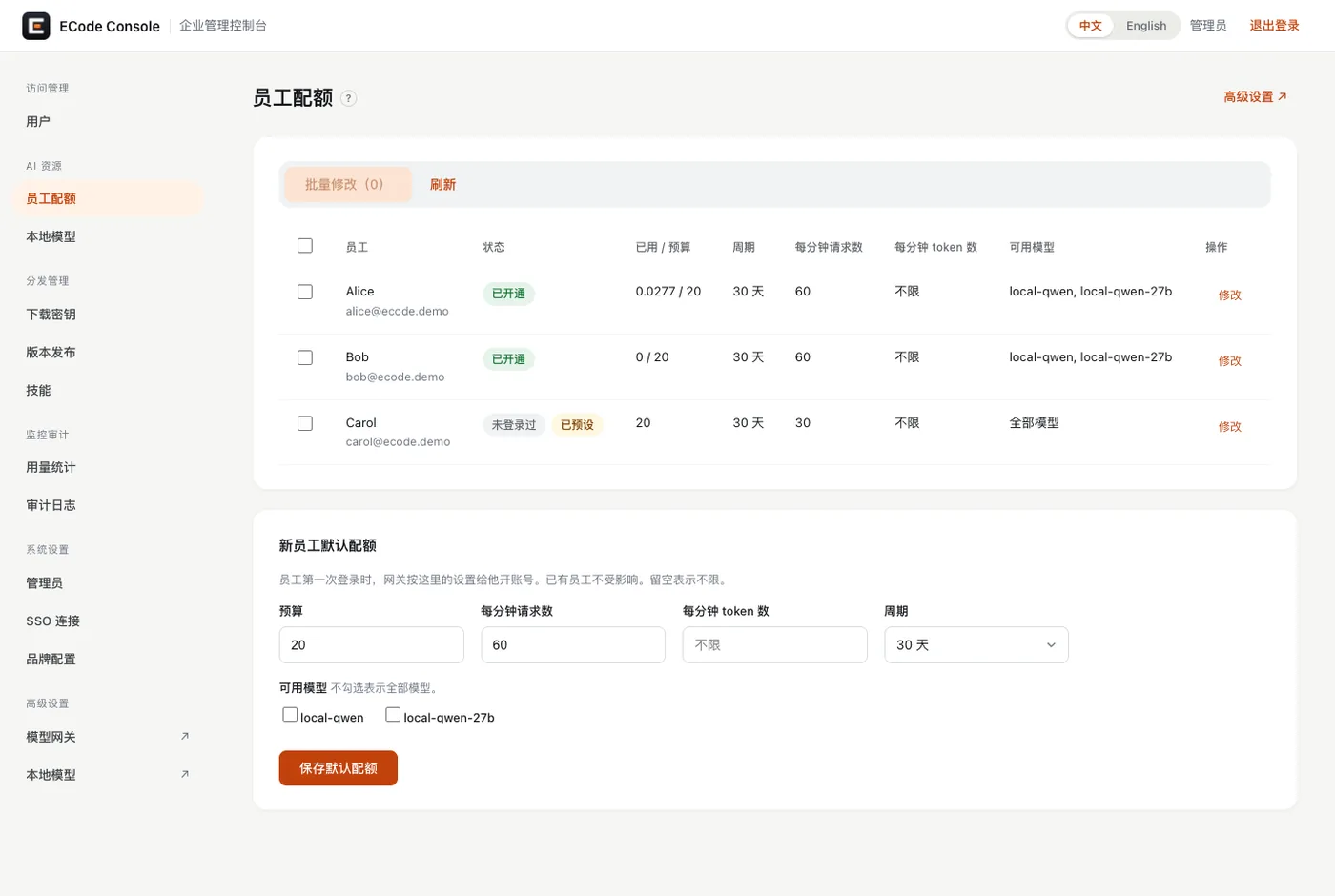
- 员工配额:每个员工的预算、周期、每分钟请求数、每分钟 token 数和可用模型。可以批量修改,也可以设置新员工的默认配额。
- 本地模型:启动和停止本地模型,查看 CPU、内存、GPU 和显存。显存不够时,页面提示先停哪个模型。
- Employee quotas shows each employee's budget, period, requests per minute, tokens per minute and available models. Admins can edit employees in bulk and set the default quota for new employees.
- Local models starts and stops local models and shows CPU, memory, GPU and GPU memory. When GPU memory runs short, the page says which model to stop first.
1.0 已知限制Known limits in 1.0
| 限制Limit | 影响Impact | 当前做法What to do now |
|---|---|---|
| Mac 应用和 Windows 安装包没有代码签名The Mac app and the Windows installer are not code-signed | Mac 应用只有临时签名(ad-hoc),没有正式的开发者签名。从浏览器下载后第一次打开会被 Gatekeeper 拦截。按 macOS 版本不同,提示「无法验证开发者」或「已损坏,无法打开」。Windows 安装时 SmartScreen 会警告。The Mac app has only an ad-hoc signature, with no developer signature. After a browser download, Gatekeeper blocks the first launch. Depending on the macOS version, it says the developer cannot be verified, or that the app is damaged and can't be opened. SmartScreen warns during the Windows install. | 员工按员工快速上手的安装一节手动放行。Mac 图形界面的首次打开过程在参考设备上没有实测。Employees allow the app once by hand, as the quick start describes. The first launch through the Mac graphical interface was not tested on the reference device. |
| 内容通道在 1.1 提供The content channel arrives in 1.1 | 1.0 只带客户端内置的插件和技能。新增或更新插件要发新客户端。1.0 has only the plugins and skills built into the client. Adding or updating a plugin takes a new client release. | 1.1 起,插件和技能经签名通道更新。From 1.1, plugins and skills update through a signed channel. |
| 自动更新关闭Auto-update is off | 员工不会收到更新提示。Employees get no update prompt. | 管理员上传新版本,通知员工重新下载安装。Admins upload the new version and ask employees to download and install it again. |
| 一台电脑的一个系统账户只给一名员工用One computer user account per employee | 员工 A 退出、员工 B 在同一个系统账户里登录后,侧边栏仍列出 A 的本地任务。If employee A signs out and employee B signs in under the same user account, the sidebar still lists A's local tasks. | 每名员工使用自己的系统账户。Each employee uses their own user account. |
| 办公文档不能下载额外字体Office documents cannot download extra fonts | 厂商的字体服务器被屏蔽。生成幻灯片、文字文档、电子表格和 PDF 时,不能下载新字体。The vendor font server is blocked, so slides, documents, spreadsheets and PDFs cannot download new fonts while they are generated. | 文档使用电脑上已有的字体。Documents use the fonts already on the computer. |
| 办公文档的视觉检查在本地模型上不运行Visual checks of office documents do not run on local models | 1.0 的本地模型不支持图片输入。智能体看不到渲染出的页面,会说明页面没有做视觉检查。The 1.0 local models do not accept image input. The agent cannot see the rendered pages, and says that it skipped the visual check. | 员工自己打开文件检查版面。接入支持图片的模型后恢复(1.1,或客户自行接入时)。Employees open the file and check the layout themselves. Visual checks return once a model with image input is connected (in 1.1, or when the customer connects one). |
| 停用员工后,客户端显示英文提示A disabled employee sees a raw English message | 员工看到网关原文:The employee sees the gateway's raw text: Authentication Error, Key is blocked. Update via `/key/unblock` if you're an admin. |
员工联系 IT。中文提示在 1.1 提供。The employee contacts IT. A Chinese message arrives in 1.1. |
| 客户端里没有额度页面The client has no quota page | 员工在客户端里看不到自己的剩余额度。Employees cannot see their remaining quota in the client. | IT 在 Console 员工配额 页查看。IT checks it on the Console's Employee quotas page. |
| 盒子的部署没有产品化Box deployment is not productized | 用客户自己的域名和证书部署盒子,1.0 没有产品化。Deploying the box with the customer's own domain and certificate is not productized in 1.0. | ECode 团队逐台部署客户的盒子。The ECode team deploys each customer's box, one at a time. |
| Microsoft Entra ID 没有在参考设备上测试Microsoft Entra ID is not tested on the reference device | Console 已实现 Entra 登录。参考设备只测了通用 OIDC(测试 IdP)。The Console implements Entra sign-in. The reference device tested only generic OIDC, with a test IdP. | 首个 Entra 客户部署时实测。Entra is tested live at the first Entra customer deployment. |
| 冷备份没有演练Cold backup has not been rehearsed | 管理员手册里的冷备份步骤没有在参考设备上跑过。The cold-backup steps in the admin guide have not been run on the reference device. | 上线前在客户设备上演练一次。Rehearse them once on the customer's box before go-live. |
| Windows 客户端还没有连盒子跑通对话The Windows client has not yet held a conversation through a box | 参考设备只在企业内网可达,Windows 测试机不在这个内网。Windows 1.0 安装包已在一个纯云的演示环境上实测:普通用户安装,输入企业码连接,在 Edge 里登录,和云端模型对话,重启后保持登录。The reference device is reachable only on a private network, and the Windows test machine is not on it. The Windows 1.0 installer was tested against a cloud-only demo environment: installed as a standard user, connected with an enterprise code, signed in through Edge, chatted with cloud models, and stayed signed in after a restart. | 首个 Windows 客户部署时,在客户设备上对盒子实测一次登录和对话。At the first Windows customer deployment, sign-in and a conversation through the box are tested once on the customer's machines. |
组件版本Component versions
两个客户端的构建日期都是 2026-11-15,都没有内置 Console 地址。
Both clients were built on 2026-11-15, and neither has a Console URL built in.
| 组件Component | 版本Version |
|---|---|
ECode 桌面客户端(macOS arm64,.dmg)ECode desktop client (macOS arm64, .dmg) |
1.0(应用内版本号 3.18.2)1.0 (in-app version number 3.18.2) |
ECode 桌面客户端(Windows x64,.exe)ECode desktop client (Windows x64, .exe) |
1.0(应用内版本号 3.18.2)1.0 (in-app version number 3.18.2) |
| ECode Console | 0.4.2 |
安装包文件:
Installer files:
| 平台Platform | 文件File | 大小Size |
|---|---|---|
| macOS arm64 | ECode-3.18.2-mac-arm64.dmg |
239,714,799 字节(228.6 MiB)239,714,799 bytes (228.6 MiB) |
| Windows x64 | ECode-3.18.2-win-x64.exe |
201,851,364 字节(192.5 MiB)201,851,364 bytes (192.5 MiB) |
两个文件的 SHA-256:
The SHA-256 checksum of each file:
d5331f37476d2f795dbbeb9d2ccb4be30ef7f2bb56c736656b01681c7f09bee2  ECode-3.18.2-mac-arm64.dmg
0d2f3268fb9caf925354f77784da3a549eb89d6c0138a072ee7aba174c235b0e  ECode-3.18.2-win-x64.exe
所有企业用这同一对安装包。员工凭下载密钥下载的文件,SHA-256 与上面一致。
Every enterprise uses this same pair of installers. The files that employees download with a download key match the checksums above.
盒子上还有一个测试身份源(测试 IdP),只用于演示。正式部署时换成企业自己的 Microsoft Entra ID 或 OIDC。
The box also carries a test identity provider (test IdP) for demos only. A production deployment replaces it with the enterprise's own Microsoft Entra ID or OIDC provider.
1.1 计划Plans for 1.1
内容通道:签名的技能和插件更新Content channel: signed skill and plugin updates
我们签名发布技能、插件和 MCP 配置。企业 Console 镜像这份内容,客户端只安装验签通过的内容。这样技能和插件更新不用发新客户端。
We sign and publish skills, plugins and MCP configurations. The enterprise Console mirrors this content, and the client installs only content whose signature checks out. Skill and plugin updates then no longer need a new client.
- 官方内容默认对员工可用。管理员可以隐藏某一项。
- 企业可以发布自己的私有插件,由 Console 签名。
- 盒子能联网时每小时同步。不能联网时,管理员导入离线内容包。
- Official content is available to employees by default. Admins can hide any item.
- Enterprises can publish their own private plugins, signed by the Console.
- A box with internet access syncs every hour. Without internet access, admins import an offline content bundle.
代码签名Code signing
Mac 应用使用开发者证书签名并经过公证。Windows 安装包使用代码签名证书。员工安装时不再看到 Gatekeeper 和 SmartScreen 警告。
The Mac app is signed with a developer certificate and notarized. The Windows installer is signed with a code-signing certificate. Employees no longer see Gatekeeper or SmartScreen warnings when they install.
配套文档Related docs
- ECode 1.0 管理员手册:登录控制台、配置单点登录、管理员工和额度、管理本地模型、发布客户端、查看用量和审计、备份。
- ECode 1.0 员工快速上手:下载、安装、连接企业、登录、切换企业、选模型、额度和数据位置。
- ECode 1.0 admin guide: Console sign-in, single sign-on, employees and quotas, local models, client releases, usage and audit, and backup.
- ECode 1.0 employee quick start: download, install, connect to your enterprise, sign in, switch enterprise, pick a model, quotas and where data lives.